Part 1
요약·해설
SB24·SB29, I2S clock, OpenPDM2PCM, raw terminal capture와 두 Audacity 화면을 보존합니다.
PDM microphone
16-bit PCM
1 s · 32,000 bytes
Part 2
접을 수 있는 영어 원문 전체
영어 원문 전체 펼치기
862C769887C9F23CD15F37CA3EC4C5DCA04DCA05FC55E50D7A7636A53CB93577
.. zephyr:code-sample:: x-nucleo-iks02a1-mic
   :name: X-NUCLEO-IKS02A1 shield - MEMS microphone
   :relevant-api: audio_dmic_interface

   Acquire audio using the digital MEMS microphone on X-NUCLEO-IKS02A1 shield.

Overview
********
This sample enables the digital MEMS microphone on X-NUCLEO-IKS02A1
shields

This sample provides an example of how to acquire audio through
the digital MEMS microphone on X-NUCLEO-IKS02A1 shield.
The microphone generates a PDM stream which is acquired through I2S.
The PDM stream is then converted to PCM using the OpenPDM2PCM library
available in zephyrproject/modules/hal/st/audio/microphone.

Requirements
************

This sample communicates over I2C with the X-NUCLEO-IKS02A1 shield
stacked on a board with an Arduino connector.

.. note::

   Please note that, in order to make the shield working on top of this board,
   it is needed to have SB24 and SB29 solder bridges properly closed. In this way
   the PDM microphone clock and data lines get connected to SPI clock and MOSI.
   Similar consideration may apply to other boards as well.

References
**********

- X-NUCLEO-IKS02A1: https://www.st.com/en/ecosystems/x-nucleo-iks02a1.html

Building and Running
********************

This sample runs with X-NUCLEO-IKS02A1 stacked on any board with a matching
Arduino connector. For this example, we use a :ref:`nucleo_f411re_board` board.
To build the sample you can use following command:

.. zephyr-app-commands::
   :zephyr-app: samples/shields/x_nucleo_iks02a1/microphone/
   :board: nucleo_f411re
   :goals: build
   :compact:

.. note::

   In case a different board is used, one of the things that must be verified before
   building the sample is the I2S output clock frequency configuration. For example,
   for nucleo_f411re board, we have the following file that configures the I2SPLL and
   have a dependency on HSE/HSI:
   :zephyr_file:`boards/shields/x_nucleo_iks02a1/boards/nucleo_f411re.overlay`

   The user is invited to verify which osci is configured on the used host board
   defconfig file and calculate the final I2SClk frequency, e.g.
   :zephyr_file:`boards/st/nucleo_f411re/nucleo_f411re.dts`


Sample Output
=============

The example acquires one second of audio and prints out the PCM stream on COM port.
The acquisition starts immediately after the reset button is pressed.

The characteristics of the PCM audio are hardcoded in the example:

- 16KHz sample rate
- 16 bits per sample
- 1 channel (mono)

One second of acquisition at a 1 channel 16KHz sampling rate yields 16,000 16-bit samples.
The microphone PDM requested clock should lead the MP34DT05 driver to select an
oversampling/decimation factor to result in approximately a 2MHz bit clock.

See PCM and PDM configuration in file :zephyr_file:`samples/shields/x_nucleo_iks02a1/microphone/src/main.c`.

.. note:: It is possible to change the AUDIO_FREQ to 32000 acquiring only 500 ms.

At the end of the acquisition the PCM data will be printed on the terminal
emulator in either binary or ASCII format. The output is controlled by the
:c:macro:`PCM_OUTPUT_IN_ASCII` macro, off by default, in
:zephyr_file:`samples/shields/x_nucleo_iks02a1/microphone/src/main.c`.

Binary PCM Output
-----------------

The Nucleo F411RE board presents itself to the host
as a USB CDC class, and will use ``/dev/ttyACM0``
device for communication. The ``/dev/ttyACM0`` port
must be configured in raw mode to avoid having
special characters (such as :kbd:`CTRL-Z` or :kbd:`CTRL-D`)
processed and 'cooked out'.

.. code-block:: console

   stty -F /dev/ttyACM0 115200 raw
   cat /dev/ttyACM0 > /tmp/sound.raw
   dos2unix -f /tmp/sound.raw

.. note::

   The dos2unix command is used to recover the situation in which the character 0x0a is
   interpreted as NL and an 0x0d (CR) is added. If you don't remove it the audio stream would
   get corrupted.

.. warning::

   The /tmp/sound.raw file final size should result exactly of 32000 byte, but sometimes may
   happen that 1 or 2 spurious 0x00 bytes are put at the beginning. In this case the user
   may get rid of them using the following linux command (change ``skip`` value according
   to number of spurious bytes to be removed):

   dd if=sound.raw of=sound_clean.raw bs=1 skip=1


ASCII PCM Output
----------------

It is also possible to recompile and to have PCM output in ASCII, which needs
to be converted to binary later on. The output format is the following:

.. code-block:: console

    -- start
    0xfbe0,
    0xfbf0,
    0xfc0c,
    0xfc24,
    0xfc3c,
    0xfc4c,
    0xfc68,
    0xfc48,

    [...]

    0xfb98,
    0xfb98,
    0xfbb8,
    0xfbac,
    0xfbc4,
    0xfbe8,
    0xfbf4,
    -- end

Play PCM Audio
--------------

Now that we have a binary PCM file (say sound.raw), you can use,
for example, the audacity open source editor/player to load and play it.

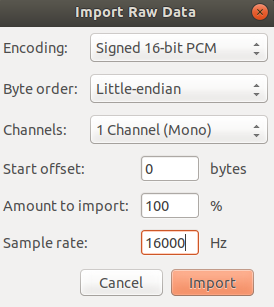
Use the 'Import->Raw Data' menu to load the sound.raw file as
signed 16 bit PCM, Little Endian, mono format @16KHz:

.. image:: ../../../../../../../samples/shields/x_nucleo_iks02a1/microphone/img/audio_import.png
     :width: 274px
     :height: 307px
     :align: center
     :alt: audio_import

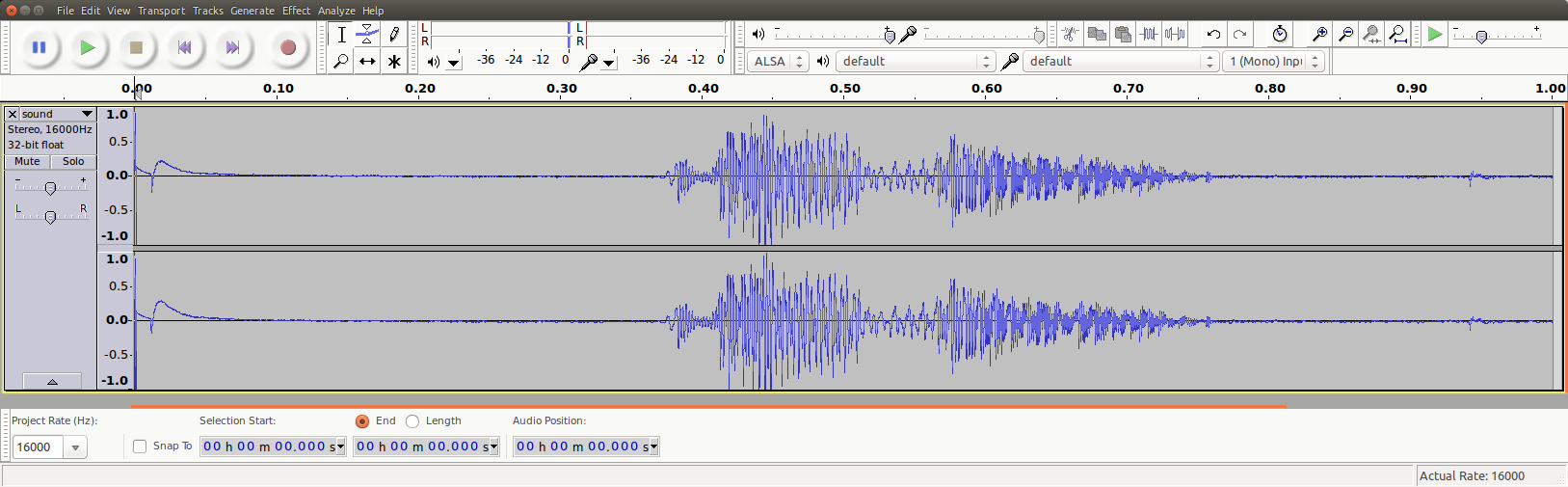
After the file is imported you can analyze and play the 1sec audio file:

.. image:: ../../../../../../../samples/shields/x_nucleo_iks02a1/microphone/img/audio_file.png
     :width: 1627px
     :height: 505px
     :align: center
     :alt: audio_file
Part 3
한국어 전문 번역
개요
이 sample은 X-NUCLEO-IKS02A1 shield의 digital MEMS microphone을 활성화해 audio를 획득하는 방법을 보여 줍니다.
Microphone이 만드는 PDM stream을 I2S로 받아, zephyrproject/modules/hal/st/audio/microphone에 있는 OpenPDM2PCM library로 PCM stream으로 변환합니다. 즉, physical microphone의 1-bit 고속 PDM data를 application이 다룰 수 있는 16-bit PCM sample로 바꾸는 흐름입니다.
요구 사항
Arduino connector가 있는 board 위에 X-NUCLEO-IKS02A1 shield를 쌓습니다. Control path는 I2C를 사용합니다.
참고 자료
빌드 및 실행
Matching Arduino connector가 있는 board에서 실행할 수 있습니다. 공식 예제는 nucleo_f411re입니다.
west build -b nucleo_f411re samples/shields/x_nucleo_iks02a1/microphone/출력 예
Reset button을 누르면 즉시 1초 동안 audio를 획득하고 PCM stream을 COM port에 출력합니다. PCM 특성은 sample에 hardcode되어 있습니다.
- Sample rate: 16 KHz
- Sample당 16 bit
- Channel: 1개, mono
Mono 16 KHz로 1초를 획득하면 16,000개의 16-bit sample, 즉 정확히 32,000 byte가 됩니다. 요청한 microphone PDM clock은 MP34DT05 driver가 oversampling/decimation factor를 선택한 결과 약 2 MHz bit clock이 되도록 해야 합니다.
PCM과 PDM configuration은 samples/shields/x_nucleo_iks02a1/microphone/src/main.c에 있습니다. AUDIO_FREQ를 32000으로 바꾸면 500 ms만 획득할 수 있습니다.
획득이 끝나면 PCM data를 binary 또는 ASCII format으로 terminal emulator에 출력합니다. 같은 main.c의 PCM_OUTPUT_IN_ASCII macro가 형식을 제어하며 default는 off, 즉 binary입니다.
Binary PCM 출력
Nucleo F411RE는 host에 USB CDC class device로 보이며 communication에 /dev/ttyACM0를 사용합니다. CTRL-Z나 CTRL-D 같은 special character가 terminal 처리로 제거되지 않도록 port를 raw mode로 설정해야 합니다.
stty -F /dev/ttyACM0 115200 raw
cat /dev/ttyACM0 > /tmp/sound.raw
dos2unix -f /tmp/sound.rawASCII PCM 출력
PCM을 ASCII로 출력하도록 다시 compile할 수도 있지만, 재생하려면 나중에 binary로 변환해야 합니다. 출력 형식은 다음과 같습니다.
-- start
0xfbe0,
0xfbf0,
0xfc0c,
0xfc24,
0xfc3c,
0xfc4c,
0xfc68,
0xfc48,

[...]

0xfb98,
0xfb98,
0xfbb8,
0xfbac,
0xfbc4,
0xfbe8,
0xfbf4,
-- end
PCM audio 재생
Binary PCM file, 예를 들어 sound.raw를 얻었으면 open-source editor/player인 Audacity로 불러와 재생할 수 있습니다.
Audacity의 Import → Raw Data menu에서 signed 16-bit PCM, Little Endian, mono, 16 KHz로 불러옵니다.
Import가 끝나면 1초 audio waveform을 분석하고 재생할 수 있습니다.
Source
출처
영어 원문에는 문단, 문서 지시문, 표, 코드, 코드 심벌, 경로를 그대로 보존했습니다.