Part 1
요약·해설
Shell instance와 MQTT·RTT·Telnet·UART·USB·BLE transport, static·dynamic·dictionary command, handler 선택, Tab·history·wildcard·meta key·getopt, obscured input와 logger backend를 설명합니다.
UART · USB · RTT · BLE
Static · dynamic · dictionary
Edit · complete · log
Part 2
접을 수 있는 영어 원문 전체
영어 원문 전체 펼치기
5F4DE20541565537B5C1C6248F5AA10E0E665E041471EF7569E27DA587DE3122
.. _shell_api:

Shell
######

.. contents::
    :local:
    :depth: 2

Overview
********

This module allows you to create and handle a shell with a user-defined command
set. You can use it in examples where more than simple button or LED user
interaction is required. This module is a Unix-like shell with these features:

* Support for multiple instances.
* Advanced cooperation with the :ref:`logging_api`.
* Support for static and dynamic commands.
* Support for dictionary commands.
* Smart command completion with the :kbd:`Tab` key.
* Built-in commands: :command:`clear`, :command:`shell`, :command:`colors`,
  :command:`echo`, :command:`history` and :command:`resize`.
* Viewing recently executed commands using keys: :kbd:`↑` :kbd:`↓` or meta keys.
* Text edition using keys: :kbd:`←`, :kbd:`→`, :kbd:`Backspace`,
  :kbd:`Delete`, :kbd:`End`, :kbd:`Home`, :kbd:`Insert`.
* Support for ANSI escape codes: ``VT100`` and ``ESC[n~`` for cursor control
  and color printing.
* Support for editing multiline commands.
* Built-in handler to display help for the commands.
* Support for wildcards: ``*`` and ``?``.
* Support for meta keys.
* Support for getopt and getopt_long.
* Kconfig configuration to optimize memory usage.

.. note::
	Some of these features have a significant impact on RAM and flash usage,
	but many can be disabled when not needed.  To default to options which
	favor reduced RAM and flash requirements instead of features, you should
	enable :kconfig:option:`CONFIG_SHELL_MINIMAL` and selectively enable just the
	features you want.

.. _backends:

Backends
********

The module can be connected to any transport for command input and output.
At this point, the following transport layers are implemented:

* MQTT
* Segger RTT
* SMP
* Telnet
* UART
* USB
* Bluetooth LE (NUS)
* RPMSG
* DUMMY - not a physical transport layer.

Telnet
======

Enabling :kconfig:option:`CONFIG_SHELL_BACKEND_TELNET` will allow users to use telnet
as a shell backend. Connecting to it can be done using PuTTY or any ``telnet`` client.
For example:

.. code-block:: none

  telnet <ip address> <port>

By default the telnet client won't handle telnet commands and configuration. Although
command support can be enabled with :kconfig:option:`CONFIG_SHELL_TELNET_SUPPORT_COMMAND`.
This will give the telnet client access to a very limited set of supported commands but
still can be turned on if needed. One of the command options it supports is the ``ECHO``
option. This will allow the client to be in character mode (character at a time),
similar to a UART backend in that regard. This will make the client send a character
as soon as it is typed having the effect of increasing the network traffic
considerably. For that cost, it will enable the line editing,
`tab completion <tab-feature_>`_, and `history <history-feature_>`_
features of the shell.

USB CDC ACM
===========

To configure Shell USB CDC ACM backend, simply add the snippet ``cdc-acm-console``
to your build:

.. code-block:: console

   west build -S cdc-acm-console [...]

Details on the configuration settings are captured in the following files:

- :zephyr_file:`snippets/cdc-acm-console/cdc-acm-console.conf`.
- :zephyr_file:`snippets/cdc-acm-console/cdc-acm-console.overlay`.

Bluetooth LE (NUS)
==================

To configure Bluetooth LE (NUS) backend, simply add the snippet ``nus-console``
to your build:

.. code-block:: console

   west build -S nus-console [...]

Details on the configuration settings are captured in the following files:

- :zephyr_file:`snippets/nus-console/nus-console.conf`.
- :zephyr_file:`snippets/nus-console/nus-console.overlay`.

Segget RTT
==========

To configure Segger RTT backend, add the following configurations to your build:

- :kconfig:option:`CONFIG_USE_SEGGER_RTT`
- :kconfig:option:`CONFIG_SHELL_BACKEND_RTT`
- :kconfig:option:`CONFIG_SHELL_BACKEND_SERIAL`

Details on additional configuration settings are captured in:
:zephyr_file:`samples/subsys/shell/shell_module/prj_minimal_rtt.conf`.

Connecting to Segger RTT via TCP (on macOS, for example)
--------------------------------------------------------

On macOS JLinkRTTClient won't let you enter input. Instead, please use following
procedure:

* Open up a first Terminal window and enter:

  .. code-block:: none

     JLinkRTTLogger -Device NRF52840_XXAA -RTTChannel 1 -if SWD -Speed 4000 ~/rtt.log

  (change device if required)

* Open up a second Terminal window and enter:

  .. code-block:: none

     nc localhost 19021

* Now you should have a network connection to RTT that will let you enter input
  to the shell.

Commands
********

Shell commands are organized in a tree structure and grouped into the following
types:

* Root command (level 0): Gathered and alphabetically sorted in a dedicated
  memory section.
* Static subcommand (level > 0): Number and syntax must be known during compile
  time. Created in the software module.
* Dynamic subcommand (level > 0): Number and syntax does not need to be known
  during compile time. Created in the software module.


Commonly-used command groups
============================

The following list is a set of useful command groups and how to enable them:

GPIO
----

- :kconfig:option:`CONFIG_GPIO`
- :kconfig:option:`CONFIG_GPIO_SHELL`

I2C
---

- :kconfig:option:`CONFIG_I2C`
- :kconfig:option:`CONFIG_I2C_SHELL`

Sensor
------

- :kconfig:option:`CONFIG_SENSOR`
- :kconfig:option:`CONFIG_SENSOR_SHELL`

Flash
-----

- :kconfig:option:`CONFIG_FLASH`
- :kconfig:option:`CONFIG_FLASH_SHELL`

File-System
-----------

- :kconfig:option:`CONFIG_FILE_SYSTEM`
- :kconfig:option:`CONFIG_FILE_SYSTEM_SHELL`

Creating commands
=================

Use the following macros for adding shell commands:

* :c:macro:`SHELL_CMD_REGISTER` - Create root command. All root commands must
  have different name.
* :c:macro:`SHELL_COND_CMD_REGISTER` - Conditionally (if compile time flag is
  set) create root command. All root commands must have different name.
* :c:macro:`SHELL_CMD_ARG_REGISTER` - Create root command with arguments.
  All root commands must have different name.
* :c:macro:`SHELL_COND_CMD_ARG_REGISTER` - Conditionally (if compile time flag
  is set) create root command with arguments. All root commands must have
  different name.
* :c:macro:`SHELL_CMD` - Initialize a command.
* :c:macro:`SHELL_COND_CMD` - Initialize a command if compile time flag is set.
* :c:macro:`SHELL_EXPR_CMD` - Initialize a command if compile time expression is
  non-zero.
* :c:macro:`SHELL_CMD_ARG` - Initialize a command with arguments.
* :c:macro:`SHELL_COND_CMD_ARG` - Initialize a command with arguments if compile
  time flag is set.
* :c:macro:`SHELL_EXPR_CMD_ARG` - Initialize a command with arguments if compile
  time expression is non-zero.
* :c:macro:`SHELL_STATIC_SUBCMD_SET_CREATE` - Create a static subcommands
  array.
* :c:macro:`SHELL_SUBCMD_DICT_SET_CREATE` - Create a dictionary subcommands
  array.
* :c:macro:`SHELL_DYNAMIC_CMD_CREATE` - Create a dynamic subcommands array.

Commands can be created in any file in the system that includes
:zephyr_file:`include/zephyr/shell/shell.h`. All created commands are available for all
shell instances.

Static commands
---------------

Example code demonstrating how to create a root command with static
subcommands.

.. image:: ../../../../services/shell/images/static_cmd.PNG
      :align: center
      :alt: Command tree with static commands.

.. code-block:: c

	/* Creating subcommands (level 1 command) array for command "demo". */
	SHELL_STATIC_SUBCMD_SET_CREATE(sub_demo,
		SHELL_CMD(params, NULL, "Print params command.",
						       cmd_demo_params),
		SHELL_CMD(ping,   NULL, "Ping command.", cmd_demo_ping),
		SHELL_SUBCMD_SET_END
	);
	/* Creating root (level 0) command "demo" */
	SHELL_CMD_REGISTER(demo, &sub_demo, "Demo commands", NULL);

Example implementation can be found under following location:
:zephyr_file:`samples/subsys/shell/shell_module/src/main.c`.

Dictionary commands
===================
This is a special kind of static commands. Dictionary commands can be used
every time you want to use a pair: (string <-> corresponding data) in
a command handler. The string is usually a verbal description of a given data.
The idea is to use the string as a command syntax that can be prompted by the
shell and corresponding data can be used to process the command.

Let's use an example. Suppose you created a command to set an ADC gain.
It is a perfect place where a dictionary can be used. The dictionary would
be a set of pairs: (string: gain_value, int: value) where int value could
be used with the ADC driver API.

Abstract code for this task would look like this:

.. code-block:: c

	static int gain_cmd_handler(const struct shell *sh,
				    size_t argc, char **argv, void *data)
	{
		int gain;

		/* data is a value corresponding to called command syntax */
		gain = (int)data;
		adc_set_gain(gain);

		shell_print(sh, "ADC gain set to: %s\n"
				   "Value send to ADC driver: %d",
				   argv[0],
				   gain);

		return 0;
	}

	SHELL_SUBCMD_DICT_SET_CREATE(sub_gain, gain_cmd_handler,
		(gain_1, 1, "gain 1"), (gain_2, 2, "gain 2"),
		(gain_1_2, 3, "gain 1/2"), (gain_1_4, 4, "gain 1/4")
	);
	SHELL_CMD_REGISTER(gain, &sub_gain, "Set ADC gain", NULL);


This is how it would look like in the shell:

.. image:: ../../../../services/shell/images/dict_cmd.png
      :align: center
      :alt: Dictionary commands example.

Dynamic commands
----------------

Example code demonstrating how to create a root command with static and dynamic
subcommands. At the beginning dynamic command list is empty. New commands
can be added by typing:

.. code-block:: none

	dynamic add <new_dynamic_command>

Newly added commands can be prompted or autocompleted with the :kbd:`Tab` key.

.. image:: ../../../../services/shell/images/dynamic_cmd.PNG
      :align: center
      :alt: Command tree with static and dynamic commands.

.. code-block:: c

	/* Buffer for 10 dynamic commands */
	static char dynamic_cmd_buffer[10][50];

	/* commands counter */
	static uint8_t dynamic_cmd_cnt;

	/* Function returning command dynamically created
	 * in  dynamic_cmd_buffer.
	 */
	static void dynamic_cmd_get(size_t idx,
				    struct shell_static_entry *entry)
	{
		if (idx < dynamic_cmd_cnt) {
			entry->syntax = dynamic_cmd_buffer[idx];
			entry->handler  = NULL;
			entry->subcmd = NULL;
			entry->help = "Show dynamic command name.";
		} else {
			/* if there are no more dynamic commands available
			 * syntax must be set to NULL.
			 */
			entry->syntax = NULL;
		}
	}

	SHELL_DYNAMIC_CMD_CREATE(m_sub_dynamic_set, dynamic_cmd_get);
	SHELL_STATIC_SUBCMD_SET_CREATE(m_sub_dynamic,
		SHELL_CMD(add, NULL,"Add new command to dynamic_cmd_buffer and"
			  " sort them alphabetically.",
			  cmd_dynamic_add),
		SHELL_CMD(execute, &m_sub_dynamic_set,
			  "Execute a command.", cmd_dynamic_execute),
		SHELL_CMD(remove, &m_sub_dynamic_set,
			  "Remove a command from dynamic_cmd_buffer.",
			  cmd_dynamic_remove),
		SHELL_CMD(show, NULL,
			  "Show all commands in dynamic_cmd_buffer.",
			  cmd_dynamic_show),
		SHELL_SUBCMD_SET_END
	);
	SHELL_CMD_REGISTER(dynamic, &m_sub_dynamic,
		   "Demonstrate dynamic command usage.", cmd_dynamic);

Example implementation can be found under following location:
:zephyr_file:`samples/subsys/shell/shell_module/src/dynamic_cmd.c`.

Commands execution
==================

Each command or subcommand may have a handler. The shell executes the handler
that is found deepest in the command tree and further subcommands (without a
handler) are passed as arguments. Characters within parentheses are treated
as one argument. If shell won't find a handler it will display an error message.

Commands can be also executed from a user application using any active backend
and a function :c:func:`shell_execute_cmd`, as shown in this example:

.. code-block:: c

	int main(void)
	{
		/* Below code will execute "clear" command on a DUMMY backend */
		shell_execute_cmd(NULL, "clear");

		/* Below code will execute "shell colors off" command on
		 * an UART backend
		 */
		shell_execute_cmd(shell_backend_uart_get_ptr(),
				  "shell colors off");
	}

Enable the DUMMY backend by setting the Kconfig
:kconfig:option:`CONFIG_SHELL_BACKEND_DUMMY` option.

Commands execution example
--------------------------

Let's assume a command structure as in the following figure, where:

* :c:macro:`root_cmd` - root command without a handler
* :c:macro:`cmd_xxx_h` - command has a handler
* :c:macro:`cmd_xxx` - command does not have a handler

.. image:: ../../../../services/shell/images/execution.png
      :align: center
      :alt: Command tree with static commands.

Example 1
^^^^^^^^^
Sequence: :c:macro:`root_cmd` :c:macro:`cmd_1_h` :c:macro:`cmd_12_h`
:c:macro:`cmd_121_h` :c:macro:`parameter` will execute command
:c:macro:`cmd_121_h` and :c:macro:`parameter` will be passed as an argument.

Example 2
^^^^^^^^^
Sequence: :c:macro:`root_cmd` :c:macro:`cmd_2` :c:macro:`cmd_22_h`
:c:macro:`parameter1` :c:macro:`parameter2` will execute command
:c:macro:`cmd_22_h` and :c:macro:`parameter1` :c:macro:`parameter2`
will be passed as an arguments.

Example 3
^^^^^^^^^
Sequence: :c:macro:`root_cmd` :c:macro:`cmd_1_h` :c:macro:`parameter1`
:c:macro:`cmd_121_h` :c:macro:`parameter2` will execute command
:c:macro:`cmd_1_h` and :c:macro:`parameter1`, :c:macro:`cmd_121_h` and
:c:macro:`parameter2` will be passed as an arguments.

Example 4
^^^^^^^^^
Sequence: :c:macro:`root_cmd` :c:macro:`parameter` :c:macro:`cmd_121_h`
:c:macro:`parameter2` will not execute any command.


Command handler
----------------

Simple command handler implementation:

.. code-block:: c

	static int cmd_handler(const struct shell *sh, size_t argc,
				char **argv)
	{
		ARG_UNUSED(argc);
		ARG_UNUSED(argv);

		shell_fprintf(shell, SHELL_INFO, "Print info message\n");

		shell_print(sh, "Print simple text.");

		shell_warn(sh, "Print warning text.");

		shell_error(sh, "Print error text.");

		return 0;
	}

Function :c:func:`shell_fprintf` or the shell print macros:
:c:macro:`shell_print`, :c:macro:`shell_info`, :c:macro:`shell_warn` and
:c:macro:`shell_error` can be used from the command handler or from threads,
but not from an interrupt context. Instead, interrupt handlers should use
:ref:`logging_api` for printing.

Command help
------------

Every user-defined command or subcommand can have its own help description.
The help for commands and subcommands can be created with respective macros:
:c:macro:`SHELL_CMD_REGISTER`, :c:macro:`SHELL_CMD_ARG_REGISTER`,
:c:macro:`SHELL_CMD`, and :c:macro:`SHELL_CMD_ARG`.

Shell prints this help message when you call a command
or subcommand with ``-h`` or ``--help`` parameter.

Parent commands
---------------

In the subcommand handler, you can access both the parameters passed to
commands or the parent commands, depending on how you index ``argv``.

* When indexing ``argv`` with positive numbers, you can access the parameters.
* When indexing ``argv`` with negative numbers, you can access the parent
  commands.
* The subcommand to which the handler belongs has the ``argv`` index of 0.

.. code-block:: c

	static int cmd_handler(const struct shell *sh, size_t argc,
			       char **argv)
	{
		ARG_UNUSED(argc);

		/* If it is a subcommand handler parent command syntax
		 * can be found using argv[-1].
		 */
		shell_print(sh, "This command has a parent command: %s",
			      argv[-1]);

		/* Print this command syntax */
		shell_print(sh, "This command syntax is: %s", argv[0]);

		/* Print first argument */
		shell_print(sh, "%s", argv[1]);

		return 0;
	}

Built-in commands
=================

These commands are activated by :kconfig:option:`CONFIG_SHELL_CMDS` set to ``y``.

* :command:`clear` - Clears the screen.
* :command:`history` - Shows the recently entered commands.
* :command:`resize` - Must be executed when terminal width is different than 80
  characters or after each change of terminal width. It ensures proper
  multiline text display and :kbd:`←`, :kbd:`→`, :kbd:`End`, :kbd:`Home` keys
  handling. Currently this command works only with UART flow control switched
  on. It can be also called with a subcommand:

	* :command:`default` - Shell will send terminal width = 80 to the
	  terminal and assume successful delivery.

  These command needs extra activation:
  :kconfig:option:`CONFIG_SHELL_CMDS_RESIZE` set to ``y``.
* :command:`select` - It can be used to set new root command. Exit to main
  command tree is with alt+r. This command needs extra activation:
  :kconfig:option:`CONFIG_SHELL_CMDS_SELECT` set to ``y``.
* :command:`shell` - Root command with useful shell-related subcommands like:

	* :command:`echo` - Toggles shell echo.
        * :command:`colors` - Toggles colored syntax. This might be helpful in
          case of Bluetooth shell to limit the amount of transferred bytes.
	* :command:`stats` - Shows shell statistics.

.. _tab-feature:

Tab Feature
***********

The Tab button can be used to suggest commands or subcommands. This feature
is enabled by :kconfig:option:`CONFIG_SHELL_TAB` set to ``y``.
It can also be used for partial or complete auto-completion of commands.
This feature is activated by
:kconfig:option:`CONFIG_SHELL_TAB_AUTOCOMPLETION` set to ``y``.
When user starts writing a command and presses the :kbd:`Tab` button then
the shell will do one of 3 possible things:

* Autocomplete the command.
* Prompts available commands and if possible partly completes the command.
* Will not do anything if there are no available or matching commands.

.. image:: ../../../../services/shell/images/tab_prompt.png
      :align: center
      :alt: Tab Feature usage example

.. _history-feature:

History Feature
***************

This feature enables commands history in the shell. It is activated by:
:kconfig:option:`CONFIG_SHELL_HISTORY` set to ``y``. History can be accessed
using keys: :kbd:`↑` :kbd:`↓` or :kbd:`Ctrl+n` and :kbd:`Ctrl+p`
if meta keys are active.
Number of commands that can be stored depends on size
of :kconfig:option:`CONFIG_SHELL_HISTORY_BUFFER` parameter.

Wildcards Feature
*****************

The shell module can handle wildcards. Wildcards are interpreted correctly
when expanded command and its subcommands do not have a handler. For example,
if you want to set logging level to ``err`` for the ``app`` and ``app_test``
modules you can execute the following command:

.. code-block:: none

	log enable err a*

.. image:: ../../../../services/shell/images/wildcard.png
      :align: center
      :alt: Wildcard usage example

This feature is activated by :kconfig:option:`CONFIG_SHELL_WILDCARD` set to ``y``.

Meta Keys Feature
*****************

The shell module supports the following meta keys:

.. list-table:: Implemented meta keys
   :widths: 10 40
   :header-rows: 1

   * - Meta keys
     - Action
   * - :kbd:`Ctrl+a`
     - Moves the cursor to the beginning of the line.
   * - :kbd:`Ctrl+b`
     - Moves the cursor backward one character.
   * - :kbd:`Ctrl+c`
     - Preserves the last command on the screen and starts a new command in
       a new line.
   * - :kbd:`Ctrl+d`
     - Deletes the character under the cursor.
   * - :kbd:`Ctrl+e`
     - Moves the cursor to the end of the line.
   * - :kbd:`Ctrl+f`
     - Moves the cursor forward one character.
   * - :kbd:`Ctrl+k`
     - Deletes from the cursor to the end of the line.
   * - :kbd:`Ctrl+l`
     - Clears the screen and leaves the currently typed command at the top of
       the screen.
   * - :kbd:`Ctrl+n`
     - Moves in history to next entry.
   * - :kbd:`Ctrl+p`
     - Moves in history to previous entry.
   * - :kbd:`Ctrl+u`
     - Clears the currently typed command.
   * - :kbd:`Ctrl+w`
     - Removes the word or part of the word to the left of the cursor. Words
       separated by period instead of space are treated as one word.
   * - :kbd:`Alt+b`
     - Moves the cursor backward one word.
   * - :kbd:`Alt+f`
     - Moves the cursor forward one word.

This feature is activated by :kconfig:option:`CONFIG_SHELL_METAKEYS` set to ``y``.

Getopt Feature
*****************

Some shell users apart from subcommands might need to use options as well.
the arguments string, looking for supported options. Typically, this task
is accomplished by the ``getopt`` family functions.

For this purpose shell supports the getopt and getopt_long libraries available
in the FreeBSD project. This feature is activated by:
:kconfig:option:`CONFIG_POSIX_C_LIB_EXT` set to ``y`` and :kconfig:option:`CONFIG_GETOPT_LONG`
set to ``y``.

This feature can be used in thread safe as well as non thread safe manner.
The former is full compatible with regular getopt usage while the latter
a bit differs.

An example non-thread safe usage:

.. code-block:: c

  char *cvalue = NULL;
  while ((char c = getopt(argc, argv, "abhc:")) != -1) {
        switch (c) {
        case 'c':
                cvalue = optarg;
                break;
        default:
                break;
        }
  }

An example thread safe usage:

.. code-block:: c

  char *cvalue = NULL;
  struct getopt_state *state;
  while ((char c = getopt(argc, argv, "abhc:")) != -1) {
        state = getopt_state_get();
        switch (c) {
        case 'c':
                cvalue = state->optarg;
                break;
        default:
                break;
        }
  }

Thread safe getopt functionality is activated by
:kconfig:option:`CONFIG_SHELL_GETOPT` set to ``y``.

Obscured Input Feature
**********************

With the obscured input feature, the shell can be used for implementing a login
prompt or other user interaction whereby the characters the user types should
not be revealed on screen, such as when entering a password.

Once the obscured input has been accepted, it is normally desired to return the
shell to normal operation.  Such runtime control is possible with the
``shell_obscure_set`` function.

An example of login and logout commands using this feature is located in
:zephyr_file:`samples/subsys/shell/shell_module/src/main.c` and the config file
:zephyr_file:`samples/subsys/shell/shell_module/prj_login.conf`.

This feature is activated upon startup by :kconfig:option:`CONFIG_SHELL_START_OBSCURED`
set to ``y``. With this set either way, the option can still be controlled later
at runtime. :kconfig:option:`CONFIG_SHELL_CMDS_SELECT` is useful to prevent entry
of any other command besides a login command, by means of the
``shell_set_root_cmd`` function. Likewise, :kconfig:option:`CONFIG_SHELL_PROMPT_UART`
allows you to set the prompt upon startup, but it can be changed later with the
``shell_prompt_change`` function.

Shell Logger Backend Feature
****************************

Shell instance can act as the :ref:`logging_api` backend. Shell ensures that log
messages are correctly multiplexed with shell output. Log messages from logger
thread are enqueued and processed in the shell thread. Logger thread will block
for configurable amount of time if queue is full, blocking logger thread context
for that time. Oldest log message is removed from the queue after timeout and
new message is enqueued. Use the ``shell stats show`` command to retrieve
number of log messages dropped by the shell instance. Log queue size and timeout
are :c:macro:`SHELL_DEFINE` arguments.

This feature is activated by: :kconfig:option:`CONFIG_SHELL_LOG_BACKEND` set to ``y``.

.. warning::
	Enqueuing timeout must be set carefully when multiple backends are used
	in the system. The shell instance could	have a slow transport or could
	block, for example, by a UART with hardware flow control. If timeout is
	set too high, the logger thread could be blocked and impact other logger
	backends.

.. warning::
	As the shell is a complex logger backend, it can not output logs if
	the application crashes before the shell thread is running. In this
	situation, you can enable one of the simple logging backends instead,
	such as UART (:kconfig:option:`CONFIG_LOG_BACKEND_UART`) or
	RTT (:kconfig:option:`CONFIG_LOG_BACKEND_RTT`), which are available earlier
	during system initialization.

RTT Backend Channel Selection
*****************************

Instead of using the shell as a logger backend, RTT shell backend and RTT log
backend can also be used simultaneously, but over different channels. By
separating them, the log can be captured or monitored without shell output or
the shell may be scripted without log interference. Enabling both the Shell RTT
backend and the Log RTT backend does not work by default, because both default
to channel ``0``. There are two options:

1. The Shell buffer can use an alternate channel, for example using
:kconfig:option:`CONFIG_SHELL_BACKEND_RTT_BUFFER` set to ``1``.
This allows monitoring the log using `JLinkRTTViewer
<https://www.segger.com/products/debug-probes/j-link/technology/about-real-time-transfer/#j-link-rtt-viewer>`_
while a script interfaces over channel 1.

2. The Log buffer can use an alternate channel, for example using
:kconfig:option:`CONFIG_LOG_BACKEND_RTT_BUFFER` set to ``1``.
This allows interactive use of the shell through JLinkRTTViewer, while the log
is written to file.

See `shell backends <backends_>`_ for details on how to enable RTT as a Shell backend.

Usage
*****

The following code shows a simple use case of this library:

.. code-block:: c

	int main(void)
	{

	}

	static int cmd_demo_ping(const struct shell *sh, size_t argc,
				 char **argv)
	{
		ARG_UNUSED(argc);
		ARG_UNUSED(argv);

		shell_print(sh, "pong");
		return 0;
	}

	static int cmd_demo_params(const struct shell *sh, size_t argc,
				   char **argv)
	{
		int cnt;

		shell_print(sh, "argc = %d", argc);
		for (cnt = 0; cnt < argc; cnt++) {
			shell_print(sh, "  argv[%d] = %s", cnt, argv[cnt]);
		}
		return 0;
	}

	/* Creating subcommands (level 1 command) array for command "demo". */
	SHELL_STATIC_SUBCMD_SET_CREATE(sub_demo,
		SHELL_CMD(params, NULL, "Print params command.",
						       cmd_demo_params),
		SHELL_CMD(ping,   NULL, "Ping command.", cmd_demo_ping),
		SHELL_SUBCMD_SET_END
	);
	/* Creating root (level 0) command "demo" without a handler */
	SHELL_CMD_REGISTER(demo, &sub_demo, "Demo commands", NULL);

	/* Creating root (level 0) command "version" */
	SHELL_CMD_REGISTER(version, NULL, "Show kernel version", cmd_version);


Users may use the :kbd:`Tab` key to complete a command/subcommand or to see the
available subcommands for the currently entered command level.
For example, when the cursor is positioned at the beginning of the command
line and the :kbd:`Tab` key is pressed, the user will see all root (level 0)
commands:

.. code-block:: none

	  clear  demo  shell  history  log  resize  version


.. note::
	To view the subcommands that are available for a specific command, you
	must first type a :kbd:`space` after this command and then hit
	:kbd:`Tab`.

These commands are registered by various modules, for example:

* :command:`clear`, :command:`shell`, :command:`history`, and :command:`resize`
  are built-in commands which have been registered by
  :zephyr_file:`subsys/shell/shell.c`
* :command:`demo` and :command:`version` have been registered in example code
  above by main.c
* :command:`log` has been registered by :zephyr_file:`subsys/logging/log_cmds.c`

Then, if a user types a :command:`demo` command and presses the :kbd:`Tab` key,
the shell will only print the subcommands registered for this command:

.. code-block:: none

	  params  ping

API Reference
*************

.. doxygengroup:: shell_api
Part 3
한국어 전문 번역
Overview
Shell module은 user-defined command set을 가진 interactive shell을 만들고 처리합니다. Button이나 LED보다 풍부한 user interaction이 필요한 sample과 product diagnostics에 사용할 수 있는 Unix-like shell입니다.
- 여러 shell instance와 transport backend를 동시에 지원합니다.
- Logging subsystem과 협력해 command input을 보존하면서 log를 출력합니다.
- Static·dynamic·dictionary command와 tree-shaped subcommand를 지원합니다.
- Tab completion, built-in
clear·shell·colors·echo·history·resize를 제공합니다. - Arrow·meta key history, cursor 이동, Backspace·Delete·Home·End·Insert editing을 지원합니다.
- VT100과
ESC[n~ANSI sequence, color, multiline command를 처리합니다. - Command help,
*·?wildcard, getopt/getopt_long를 지원합니다. - Kconfig로 필요 없는 기능을 꺼 RAM과 flash 사용량을 줄일 수 있습니다.
Backends
Shell command input과 output은 transport abstraction을 통해 연결됩니다. Zephyr 3.7.0은 MQTT, Segger RTT, SMP, Telnet, UART, USB, Bluetooth LE NUS, RPMSG와 물리 transport가 없는 DUMMY backend를 제공합니다.
Telnet
CONFIG_SHELL_BACKEND_TELNET을 켜면 PuTTY 또는 일반 telnet client로 접속할 수 있습니다.
telnet <ip address> <port>기본 client는 telnet command negotiation을 처리하지 않습니다. CONFIG_SHELL_TELNET_SUPPORT_COMMAND을 켜면 제한된 option을 지원하며 그중 ECHO는 UART처럼 character-at-a-time mode를 가능하게 합니다.
Character를 입력 즉시 전송하므로 network traffic이 크게 늘지만 line editing, Tab completion과 history를 사용할 수 있습니다. 기능성 대신 packet 수와 latency 비용을 지불하는 선택입니다.
USB CDC ACM
USB CDC ACM shell은 build에 cdc-acm-console snippet을 추가합니다.
west build -S cdc-acm-console [...]세부 설정은 snippets/cdc-acm-console/cdc-acm-console.conf와 cdc-acm-console.overlay에 있습니다.
Bluetooth LE (NUS)
Bluetooth LE Nordic UART Service backend는 nus-console snippet으로 구성합니다.
west build -S nus-console [...]세부 설정은 snippets/nus-console/nus-console.conf와 nus-console.overlay에 있습니다.
Segger RTT
RTT backend에는 CONFIG_USE_SEGGER_RTT, CONFIG_SHELL_BACKEND_RTT, CONFIG_SHELL_BACKEND_SERIAL을 사용합니다. 추가 설정은 samples/subsys/shell/shell_module/prj_minimal_rtt.conf를 참고합니다.
Connecting to Segger RTT via TCP (on macOS, for example)
macOS의 JLinkRTTClient는 input을 넣을 수 없으므로 두 terminal을 사용합니다. 첫 terminal에서 RTT channel 1을 TCP logger에 연결합니다.
JLinkRTTLogger -Device NRF52840_XXAA -RTTChannel 1 -if SWD -Speed 4000 ~/rtt.log필요하면 device name을 바꿉니다. 두 번째 terminal에서 logger가 연 TCP port에 연결합니다.
nc localhost 19021이제 network connection을 통해 RTT shell에 command를 입력할 수 있습니다.
Commands
Command는 tree로 조직됩니다. Level 0 root command는 dedicated memory section에 모여 alphabetic order로 정렬됩니다. Level 1 이상의 static subcommand는 수와 syntax가 compile time에 정해지고, dynamic subcommand는 runtime에 달라질 수 있습니다.
Commonly-used command groups
Subsystem별 shell command는 driver 기능과 shell command Kconfig를 함께 켭니다.
GPIO
CONFIG_GPIO + CONFIG_GPIO_SHELL
I2C
CONFIG_I2C + CONFIG_I2C_SHELL
Sensor
CONFIG_SENSOR + CONFIG_SENSOR_SHELL
Flash
CONFIG_FLASH + CONFIG_FLASH_SHELL
File-System
CONFIG_FILE_SYSTEM + CONFIG_FILE_SYSTEM_SHELL
Creating commands
Root command는 SHELL_CMD_REGISTER, conditional root는 SHELL_COND_CMD_REGISTER, argument contract가 있는 root는 SHELL_CMD_ARG_REGISTER 계열을 사용합니다. 모든 root name은 서로 달라야 합니다.
Entry initialization에는 SHELL_CMD, SHELL_COND_CMD, SHELL_EXPR_CMD과 각 argument-aware variant를 사용합니다. Static set은 SHELL_STATIC_SUBCMD_SET_CREATE, dictionary set은 SHELL_SUBCMD_DICT_SET_CREATE, dynamic set은 SHELL_DYNAMIC_CMD_CREATE로 만듭니다.
include/zephyr/shell/shell.h를 include한 system 어느 file에서나 command를 만들 수 있으며, 등록된 command는 모든 shell instance에 보입니다.
Static commands
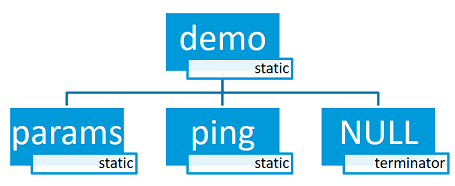
아래 공식 도식과 code는 demo root 아래 params와 ping static subcommand를 만드는 구조입니다.
/* Creating subcommands (level 1 command) array for command "demo". */
SHELL_STATIC_SUBCMD_SET_CREATE(sub_demo,
        SHELL_CMD(params, NULL, "Print params command.",
                                               cmd_demo_params),
        SHELL_CMD(ping,   NULL, "Ping command.", cmd_demo_ping),
        SHELL_SUBCMD_SET_END
);
/* Creating root (level 0) command "demo" */
SHELL_CMD_REGISTER(demo, &sub_demo, "Demo commands", NULL);
전체 implementation은 samples/subsys/shell/shell_module/src/main.c에 있습니다.
Dictionary commands
Dictionary command는 string syntax와 대응 data를 pair로 묶는 특수 static command입니다. Shell은 string을 completion 후보로 보여주고 handler는 대응 data를 직접 받아 처리합니다.
ADC gain 예에서는 gain_1, gain_2 같은 읽기 쉬운 syntax를 실제 driver에 넘길 integer gain 값과 연결합니다.
static int gain_cmd_handler(const struct shell *sh,
                            size_t argc, char **argv, void *data)
{
        int gain;

        /* data is a value corresponding to called command syntax */
        gain = (int)data;
        adc_set_gain(gain);

        shell_print(sh, "ADC gain set to: %s\n"
                           "Value send to ADC driver: %d",
                           argv[0],
                           gain);

        return 0;
}

SHELL_SUBCMD_DICT_SET_CREATE(sub_gain, gain_cmd_handler,
        (gain_1, 1, "gain 1"), (gain_2, 2, "gain 2"),
        (gain_1_2, 3, "gain 1/2"), (gain_1_4, 4, "gain 1/4")
);
SHELL_CMD_REGISTER(gain, &sub_gain, "Set ADC gain", NULL);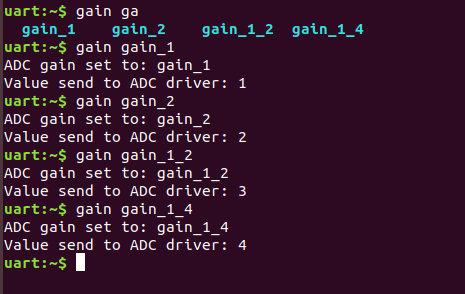
Dynamic commands
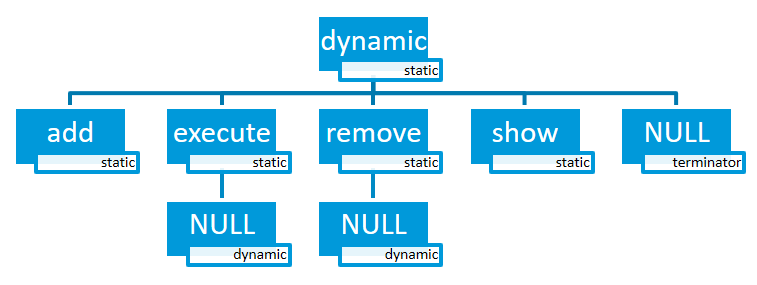
Dynamic command list는 처음 비어 있으며 다음 command로 runtime에 새 syntax를 추가할 수 있습니다.
dynamic add <new_dynamic_command>추가된 command도 Tab prompt와 autocomplete 대상입니다. Getter는 index마다 shell_static_entry를 채우고 마지막에는 entry->syntax = NULL을 설정해야 합니다.
/* Buffer for 10 dynamic commands */
static char dynamic_cmd_buffer[10][50];

/* commands counter */
static uint8_t dynamic_cmd_cnt;

/* Function returning command dynamically created
 * in  dynamic_cmd_buffer.
 */
static void dynamic_cmd_get(size_t idx,
                            struct shell_static_entry *entry)
{
        if (idx < dynamic_cmd_cnt) {
                entry->syntax = dynamic_cmd_buffer[idx];
                entry->handler  = NULL;
                entry->subcmd = NULL;
                entry->help = "Show dynamic command name.";
        } else {
                /* if there are no more dynamic commands available
                 * syntax must be set to NULL.
                 */
                entry->syntax = NULL;
        }
}

SHELL_DYNAMIC_CMD_CREATE(m_sub_dynamic_set, dynamic_cmd_get);
SHELL_STATIC_SUBCMD_SET_CREATE(m_sub_dynamic,
        SHELL_CMD(add, NULL,"Add new command to dynamic_cmd_buffer and"
                  " sort them alphabetically.",
                  cmd_dynamic_add),
        SHELL_CMD(execute, &m_sub_dynamic_set,
                  "Execute a command.", cmd_dynamic_execute),
        SHELL_CMD(remove, &m_sub_dynamic_set,
                  "Remove a command from dynamic_cmd_buffer.",
                  cmd_dynamic_remove),
        SHELL_CMD(show, NULL,
                  "Show all commands in dynamic_cmd_buffer.",
                  cmd_dynamic_show),
        SHELL_SUBCMD_SET_END
);
SHELL_CMD_REGISTER(dynamic, &m_sub_dynamic,
           "Demonstrate dynamic command usage.", cmd_dynamic);
전체 예는 samples/subsys/shell/shell_module/src/dynamic_cmd.c에 있습니다.
Commands execution
각 command 또는 subcommand는 handler를 가질 수 있습니다. Shell은 tree에서 가장 깊게 matching된 handler를 실행하고, 그 뒤 handler 없는 token은 argument로 넘깁니다. Parenthesis 안 character는 한 argument로 취급하며 handler를 찾지 못하면 error를 표시합니다.
Application은 active backend와 shell_execute_cmd()로 command string을 직접 실행할 수도 있습니다. Null shell pointer는 DUMMY backend를 사용하고, 특정 backend pointer를 주면 그 instance에서 실행합니다.
int main(void)
{
        /* Below code will execute "clear" command on a DUMMY backend */
        shell_execute_cmd(NULL, "clear");

        /* Below code will execute "shell colors off" command on
         * an UART backend
         */
        shell_execute_cmd(shell_backend_uart_get_ptr(),
                          "shell colors off");
}
DUMMY backend는 CONFIG_SHELL_BACKEND_DUMMY로 활성화합니다.
Commands execution example
다음 공식 command tree에서 root_cmd는 handler가 없고 이름 끝 _h인 command만 handler가 있다고 가정합니다.
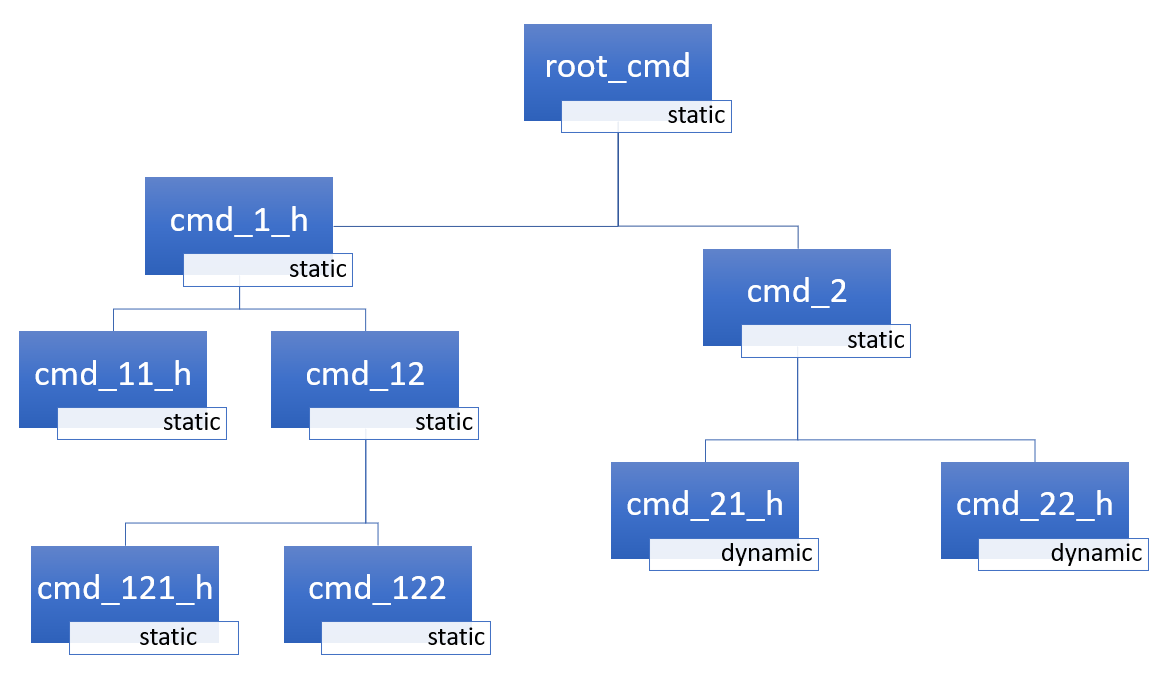
root_cmd cmd_1_h cmd_12_h cmd_121_h parameter:cmd_121_h를 실행하고parameter를 argument로 전달합니다.root_cmd cmd_2 cmd_22_h parameter1 parameter2:cmd_22_h를 실행하고 두 parameter를 전달합니다.root_cmd cmd_1_h parameter1 cmd_121_h parameter2:parameter1부터는 더 이상 subcommand path가 아니므로cmd_1_h를 실행하고 나머지 세 token을 argument로 전달합니다.root_cmd parameter cmd_121_h parameter2: root에 handler가 없고 첫 token도 subcommand가 아니므로 실행할 command가 없습니다.
Command handler
Handler는 shell pointer와 argc·argv를 받고 status를 반환합니다. Severity별 print helper를 사용할 수 있습니다.
static int cmd_handler(const struct shell *sh, size_t argc,
                        char **argv)
{
        ARG_UNUSED(argc);
        ARG_UNUSED(argv);

        shell_fprintf(shell, SHELL_INFO, "Print info message\n");

        shell_print(sh, "Print simple text.");

        shell_warn(sh, "Print warning text.");

        shell_error(sh, "Print error text.");

        return 0;
}shell_fprintf, shell_print, shell_info, shell_warn, shell_error는 command handler와 thread에서 사용할 수 있지만 interrupt context에서는 사용할 수 없습니다. ISR은 logging API로 출력해야 합니다.
Command help
User command와 subcommand에는 각자 help description을 둘 수 있습니다. Register·entry macro의 help argument가 사용되며 command 뒤에 -h 또는 --help를 주면 shell이 출력합니다.
Parent commands
Subcommand handler의 argv는 양수 index로 argument, 음수 index로 parent command를 접근합니다. Handler가 속한 command syntax는 argv[0], 바로 위 parent는 argv[-1], 첫 parameter는 argv[1]입니다.
static int cmd_handler(const struct shell *sh, size_t argc,
                       char **argv)
{
        ARG_UNUSED(argc);

        /* If it is a subcommand handler parent command syntax
         * can be found using argv[-1].
         */
        shell_print(sh, "This command has a parent command: %s",
                      argv[-1]);

        /* Print this command syntax */
        shell_print(sh, "This command syntax is: %s", argv[0]);

        /* Print first argument */
        shell_print(sh, "%s", argv[1]);

        return 0;
}
Built-in commands
CONFIG_SHELL_CMDS=y이면 clear, history, resize, shell 등의 built-in command를 제공합니다.
clear: screen을 지웁니다.history: 최근 입력 command를 표시합니다.resize: terminal width가 80이 아니거나 width가 바뀐 뒤 실행해 multiline과 cursor key를 맞춥니다. 현재 UART flow control에서만 동작하며defaultsubcommand는 width 80을 전송합니다.CONFIG_SHELL_CMDS_RESIZE가 필요합니다.select: 새 root command를 선택하며 Alt+r로 main tree에 복귀합니다.CONFIG_SHELL_CMDS_SELECT가 필요합니다.shell echo,shell colors,shell stats: echo, color와 drop 통계를 제어·조회합니다. Bluetooth에서는 color를 끄면 전송 byte를 줄일 수 있습니다.
Tab Feature
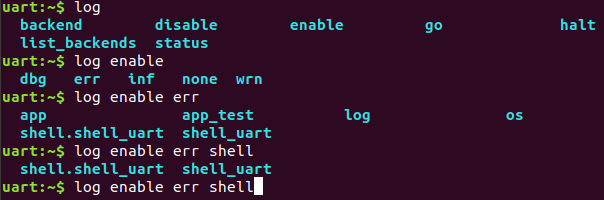
CONFIG_SHELL_TAB=y이면 Tab으로 command·subcommand 후보를 표시합니다. CONFIG_SHELL_TAB_AUTOCOMPLETION=y이면 공통 prefix 또는 전체 command를 자동 완성합니다.
입력 중 Tab을 누르면 유일한 command를 완성하거나, matching 후보를 표시하며 가능한 prefix까지 채우거나, 후보가 없으면 아무 동작도 하지 않습니다.
History Feature
CONFIG_SHELL_HISTORY=y는 command history를 활성화합니다. Up·Down 또는 meta key가 켜진 경우 Ctrl+n·Ctrl+p로 이동하며 저장 가능한 command 수는 CONFIG_SHELL_HISTORY_BUFFER 크기에 따라 달라집니다.
Wildcards Feature
Wildcard는 expanded command와 그 subcommand에 handler가 없을 때 올바르게 확장됩니다. 예를 들어 app과 app_test logging module을 모두 error level로 설정할 수 있습니다.
log enable err a*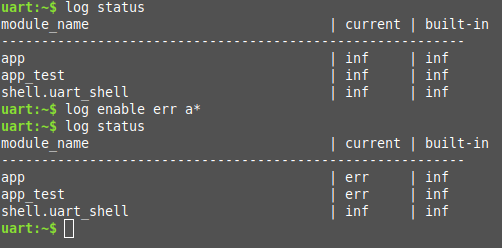
a*가 여러 logging module로 확장되는 공식 화면.이 기능은 CONFIG_SHELL_WILDCARD=y로 활성화합니다.
Meta Keys Feature
| Meta key | 동작 |
|---|---|
| Ctrl+a | Cursor를 line 시작으로 이동합니다. |
| Ctrl+b | Cursor를 한 character 뒤로 이동합니다. |
| Ctrl+c | 마지막 command를 화면에 남기고 새 line에서 새 command를 시작합니다. |
| Ctrl+d | Cursor 아래 character를 삭제합니다. |
| Ctrl+e | Cursor를 line 끝으로 이동합니다. |
| Ctrl+f | Cursor를 한 character 앞으로 이동합니다. |
| Ctrl+k | Cursor부터 line 끝까지 삭제합니다. |
| Ctrl+l | 화면을 지우고 입력 중 command를 화면 위에 다시 표시합니다. |
| Ctrl+n | History의 다음 entry로 이동합니다. |
| Ctrl+p | History의 이전 entry로 이동합니다. |
| Ctrl+u | 현재 입력 중인 command를 모두 지웁니다. |
| Ctrl+w | Cursor 왼쪽의 word 또는 word 일부를 지웁니다. Space 대신 period로 나뉜 text는 한 word로 봅니다. |
| Alt+b | Cursor를 한 word 뒤로 이동합니다. |
| Alt+f | Cursor를 한 word 앞으로 이동합니다. |
Meta key는 CONFIG_SHELL_METAKEYS=y로 활성화합니다.
Getopt Feature
Subcommand 외에 option을 받는 shell command는 FreeBSD의 getopt와 getopt_long library를 사용할 수 있습니다. CONFIG_POSIX_C_LIB_EXT=y와 CONFIG_GETOPT_LONG=y가 필요합니다.
Non-thread-safe mode는 regular global optarg를 사용합니다.
char *cvalue = NULL;
while ((char c = getopt(argc, argv, "abhc:")) != -1) {
      switch (c) {
      case 'c':
              cvalue = optarg;
              break;
      default:
              break;
      }
}
Thread-safe mode는 shell command별 getopt_state에서 optarg를 읽습니다.
char *cvalue = NULL;
struct getopt_state *state;
while ((char c = getopt(argc, argv, "abhc:")) != -1) {
      state = getopt_state_get();
      switch (c) {
      case 'c':
              cvalue = state->optarg;
              break;
      default:
              break;
      }
}
Thread-safe getopt는 CONFIG_SHELL_GETOPT=y로 활성화합니다.
Obscured Input Feature
Obscured input은 login prompt나 password처럼 typed character를 화면에 드러내지 않아야 할 때 사용합니다. Input을 받은 뒤 shell_obscure_set()으로 정상 mode로 복귀할 수 있습니다.
Login/logout 예는 samples/subsys/shell/shell_module/src/main.c와 prj_login.conf에 있습니다. Startup obscuring은 CONFIG_SHELL_START_OBSCURED로 정하지만 runtime 제어는 어느 설정에서도 가능합니다.
CONFIG_SHELL_CMDS_SELECT와 shell_set_root_cmd()를 함께 쓰면 login 전 다른 command 진입을 막을 수 있습니다. Startup prompt는 CONFIG_SHELL_PROMPT_UART, runtime prompt는 shell_prompt_change()로 바꿉니다.
Shell Logger Backend Feature
Shell instance는 logging backend로 동작하면서 command line과 log output을 올바르게 multiplex합니다. Logger thread의 message는 queue에 들어가 shell thread가 처리합니다.
Queue가 가득 차면 logger thread는 설정된 timeout 동안 block됩니다. Timeout 뒤에도 공간이 없으면 가장 오래된 log를 제거하고 새 message를 넣습니다. shell stats show로 drop 수를 확인하며 queue size와 timeout은 SHELL_DEFINE argument입니다. 기능은 CONFIG_SHELL_LOG_BACKEND=y로 켭니다.
RTT Backend Channel Selection
Shell 자체를 log backend로 쓰지 않고 RTT shell과 RTT log backend를 동시에 사용할 수 있지만 서로 다른 channel이어야 합니다. 둘 다 default channel 0을 사용하므로 그대로 켜면 충돌합니다.
CONFIG_SHELL_BACKEND_RTT_BUFFER=1로 shell을 channel 1에 둡니다. Channel 0 log는 JLinkRTTViewer로 보고 channel 1 shell은 script가 사용할 수 있습니다.CONFIG_LOG_BACKEND_RTT_BUFFER=1로 log를 channel 1에 둡니다. JLinkRTTViewer에서 channel 0 shell을 interactive하게 쓰면서 log는 file로 받을 수 있습니다.
Usage
다음 예는 demo ping, demo params와 version root command를 등록합니다.
int main(void)
{

}

static int cmd_demo_ping(const struct shell *sh, size_t argc,
                         char **argv)
{
        ARG_UNUSED(argc);
        ARG_UNUSED(argv);

        shell_print(sh, "pong");
        return 0;
}

static int cmd_demo_params(const struct shell *sh, size_t argc,
                           char **argv)
{
        int cnt;

        shell_print(sh, "argc = %d", argc);
        for (cnt = 0; cnt < argc; cnt++) {
                shell_print(sh, "  argv[%d] = %s", cnt, argv[cnt]);
        }
        return 0;
}

/* Creating subcommands (level 1 command) array for command "demo". */
SHELL_STATIC_SUBCMD_SET_CREATE(sub_demo,
        SHELL_CMD(params, NULL, "Print params command.",
                                               cmd_demo_params),
        SHELL_CMD(ping,   NULL, "Ping command.", cmd_demo_ping),
        SHELL_SUBCMD_SET_END
);
/* Creating root (level 0) command "demo" without a handler */
SHELL_CMD_REGISTER(demo, &sub_demo, "Demo commands", NULL);

/* Creating root (level 0) command "version" */
SHELL_CMD_REGISTER(version, NULL, "Show kernel version", cmd_version);
Command line 시작에서 Tab을 누르면 여러 module이 등록한 모든 root command를 표시합니다.
clear demo shell history log resize version특정 command의 subcommand를 보려면 command 뒤에 space를 입력한 다음 Tab을 눌러야 합니다. Built-in command는 subsys/shell/shell.c, 예의 demo/version은 application, log command는 subsys/logging/log_cmds.c가 등록합니다.
demo 뒤 Tab을 누르면 해당 root 아래의 두 subcommand만 표시됩니다.
params pingAPI Reference
다음 148개 항목은 공식 shell_api doxygen group의 command macro, print helper, lifecycle, parser state, transport contract와 내부 public structure를 빠짐없이 옮긴 것입니다.
공식 API reference에 포함된 static subcommand와 custom handler 예제도 공백과 줄바꿈까지 보존합니다.
SHELL_STATIC_SUBCMD_SET_CREATE(
   foo,
   SHELL_CMD(abc, ...),
   SHELL_CMD(def, ...),
   SHELL_SUBCMD_SET_END
)
static int my_handler(const struct shell *sh,
size_t argc, char **argv, void *data)
{
int val = (int)data;
shell_print(sh, "(syntax, value) : (%s, %d)", argv[0], val);
return 0;
}
SHELL_SUBCMD_DICT_SET_CREATE(sub_dict_cmds, my_handler,
(value_0, 0, "value 0"), (value_1, 1, "value 1"),
(value_2, 2, "value 2"), (value_3, 3, "value 3")
);
SHELL_CMD_REGISTER(dictionary, &sub_dict_cmds, NULL, NULL);SHELL_CMD_ARG_REGISTER- Mandatory·optional argument 수를 지정해 root command를 등록합니다.
SHELL_COND_CMD_ARG_REGISTER- Compile-time flag가 참일 때 argument-aware root command를 등록합니다.
SHELL_CMD_REGISTER- 고유 name을 가진 root command를 정적으로 등록합니다.
SHELL_COND_CMD_REGISTER- Compile-time flag가 참일 때 root command를 등록합니다.
SHELL_STATIC_SUBCMD_SET_CREATE- Compile-time에 알려진 static subcommand set을 만듭니다.
SHELL_SUBCMD_SET_CREATE- Subcommand entry array를 정의하는 기본 macro입니다.
SHELL_SUBCMD_COND_ADD- 조건이 참일 때 subcommand entry를 set에 추가합니다.
SHELL_SUBCMD_ADD- Subcommand entry를 set에 추가합니다.
SHELL_SUBCMD_SET_END- Static subcommand array 끝의 sentinel entry입니다.
SHELL_DYNAMIC_CMD_CREATE- Runtime getter를 가진 dynamic subcommand set을 만듭니다.
SHELL_CMD_ARG- Argument count contract가 있는 command entry를 초기화합니다.
SHELL_COND_CMD_ARG- Flag가 참일 때 argument-aware command entry를 초기화합니다.
SHELL_EXPR_CMD_ARG- Compile-time expression이 non-zero일 때 argument-aware command를 초기화합니다.
SHELL_CMD- Syntax, subcommand, help와 handler로 command entry를 초기화합니다.
SHELL_COND_CMD- Flag가 참일 때 command entry를 초기화합니다.
SHELL_EXPR_CMD- Compile-time expression이 non-zero일 때 command entry를 초기화합니다.
SHELL_CMD_DICT_CREATE- Syntax와 대응 data를 가진 dictionary command entry를 만듭니다.
SHELL_SUBCMD_DICT_SET_CREATE- String↔data pair로 dictionary subcommand set을 만듭니다.
SHELL_DEFAULT_BACKEND_CONFIG_FLAGS- Default shell backend의 editing·echo·color·VT100 flag 조합입니다.
SHELL_DEFINE- Transport, prompt, queue와 buffer 크기를 지정해 shell instance를 정의합니다.
SHELL_NORMAL- 일반 text 출력 severity입니다.
SHELL_INFO- 정보 message 출력 severity입니다.
SHELL_OPTION- Option 또는 강조 text 출력 severity입니다.
SHELL_WARNING- Warning message 출력 severity입니다.
SHELL_ERROR- Error message 출력 severity입니다.
shell_fprintf- Severity와 format을 지정해 shell instance로 formatted text를 출력합니다.
shell_info- Info style formatted message를 출력하는 convenience macro입니다.
shell_print- 일반 formatted message 뒤에 newline을 출력합니다.
shell_warn- Warning style formatted message를 출력합니다.
shell_error- Error style formatted message를 출력합니다.
SHELL_CMD_HELP_PRINTED- Handler가 command help를 직접 출력했음을 나타내는 return value입니다.
shell_dynamic_get- Index에 해당하는 dynamic command entry를 채우는 callback type입니다.
shell_device_filter_t- Device 조회 시 후보를 accept·reject하는 filter callback type입니다.
shell_cmd_handler- 일반 command의 argc·argv handler signature입니다.
shell_dict_cmd_handler- Dictionary command에 대응 data까지 전달하는 handler signature입니다.
shell_transport_handler_t- Transport RX·TX event를 shell core에 알리는 callback type입니다.
shell_uninit_cb_t- Shell uninitialize 완료를 알리는 callback type입니다.
shell_bypass_cb_t- Normal parser를 우회해 raw input을 받는 bypass callback type입니다.
shell_receive_state- ANSI escape와 일반 input parser의 receive state입니다.
shell_receive_state.SHELL_RECEIVE_DEFAULT- 일반 character를 처리하는 기본 receive state입니다.
shell_receive_state.SHELL_RECEIVE_ESC- ESC character를 받은 직후의 state입니다.
shell_receive_state.SHELL_RECEIVE_ESC_SEQ- ANSI escape sequence를 수집하는 state입니다.
shell_receive_state.SHELL_RECEIVE_TILDE_EXPESC[n~sequence의 tilde를 기다리는 state입니다.shell_state- Shell instance lifecycle과 panic-mode state입니다.
shell_state.SHELL_STATE_UNINITIALIZED- Transport와 context가 아직 초기화되지 않은 상태입니다.
shell_state.SHELL_STATE_INITIALIZED- 초기화됐지만 interactive processing이 시작되지 않은 상태입니다.
shell_state.SHELL_STATE_ACTIVE- Shell thread가 input과 output을 처리하는 active 상태입니다.
shell_state.SHELL_STATE_PANIC_MODE_ACTIVE- Panic path에서 synchronous output을 처리하는 상태입니다.
shell_state.SHELL_STATE_PANIC_MODE_INACTIVE- Panic mode를 사용하지 않는 상태입니다.
shell_transport_evt- Transport가 shell core에 전달하는 event 종류입니다.
shell_transport_evt.SHELL_TRANSPORT_EVT_RX_RDY- 읽을 input data가 준비됐음을 나타냅니다.
shell_transport_evt.SHELL_TRANSPORT_EVT_TX_RDY- 이전 write가 완료돼 다음 output을 보낼 수 있음을 나타냅니다.
shell_signal- Shell thread event bit 종류입니다.
shell_signal.SHELL_SIGNAL_RXRDY- Input receive-ready signal입니다.
shell_signal.SHELL_SIGNAL_LOG_MSG- Queue에 처리할 logging message가 있음을 나타냅니다.
shell_signal.SHELL_SIGNAL_KILL- Shell thread 종료 요청 signal입니다.
shell_signal.SHELL_SIGNAL_TXDONE- Transport output 완료 signal입니다.
shell_signal.SHELL_SIGNALS- Shell event signal 범위의 끝을 나타냅니다.
shell_flag- Line-ending conversion과 transport formatting flag입니다.
shell_flag.SHELL_FLAG_CRLF_DEFAULT- Default CRLF line-ending behavior를 사용합니다.
shell_flag.SHELL_FLAG_OLF_CRLF- Output LF를 CRLF로 변환합니다.
shell_device_lookup- Name과 optional filter로 device를 찾아 shell command에 제공합니다.
shell_device_filter- Device 후보가 주어진 filter 조건을 만족하는지 검사합니다.
shell_init- Shell instance와 transport를 configuration flag로 초기화합니다.
shell_uninit- Shell processing과 transport를 비동기로 uninitialize합니다.
shell_start- 초기화된 shell instance의 input processing을 시작합니다.
shell_stop- Shell instance의 processing을 중지합니다.
shell_fprintf_impl- Variable argument를 처리하는 formatted shell output 내부 구현입니다.
shell_vfprintfva_list를 받아 severity별 formatted output을 만듭니다.shell_hexdump_line- 한 line 분량 binary data를 hexadecimal·ASCII 형식으로 출력합니다.
shell_hexdump- Arbitrary buffer 전체를 여러 line hexdump로 출력합니다.
shell_process- Non-threaded 또는 polling integration에서 pending shell work를 처리합니다.
shell_prompt_change- Runtime에 instance prompt string을 바꿉니다.
shell_help- 현재 command와 subcommand의 generated help를 출력합니다.
shell_execute_cmd- Active backend context에서 string command를 programmatically 실행합니다.
shell_set_root_cmd- Command tree의 selectable root를 제한하거나 원래 root로 되돌립니다.
shell_set_bypass- Parser 대신 raw input을 받을 bypass callback을 설정합니다.
shell_ready- Shell instance가 command를 받을 준비가 됐는지 확인합니다.
shell_insert_mode_set- Insert와 overwrite editing mode를 선택합니다.
shell_use_colors_set- ANSI color 출력 사용 여부를 runtime에 바꿉니다.
shell_use_vt100_set- VT100 cursor-control sequence 사용 여부를 바꿉니다.
shell_echo_set- 입력 character echo를 켜거나 끕니다.
shell_obscure_set- Password 입력처럼 typed character를 숨기는 mode를 제어합니다.
shell_mode_delete_set- Backspace/Delete key 해석 mode를 설정합니다.
shell_get_return_value- 가장 최근 실행 command handler의 return value를 얻습니다.
log_backend_shell_api- Shell instance를 logging backend로 연결하는 log backend API입니다.
shell_cmd_entry- Static 또는 dynamic command source를 표현하는 union-like entry입니다.
shell_cmd_entry.dynamic_get- Dynamic subcommand getter callback입니다.
shell_cmd_entry.entry- Static command entry pointer입니다.
shell_static_args- Command argument count contract입니다.
shell_static_args.mandatory- Handler 실행에 필요한 mandatory argument 수입니다.
shell_static_args.optional- 허용되는 optional argument 최대 수입니다.
shell_static_entry- Syntax, help, child set, handler와 argument contract를 가진 static command입니다.
shell_static_entry.syntax- 사용자가 입력하는 command token입니다.
shell_static_entry.help-h/--help에 표시할 설명입니다.shell_static_entry.subcmd- 다음 level의 static 또는 dynamic subcommand set입니다.
shell_static_entry.handler- 가장 깊게 matching됐을 때 실행할 command handler입니다.
shell_static_entry.args- Mandatory·optional argc validation 정보입니다.
shell_transport_api- Backend transport가 구현하는 lifecycle과 byte I/O operation table입니다.
shell_transport_api.init- Transport를 초기화하고 event callback을 등록합니다.
shell_transport_api.uninit- Transport resource 해제를 시작합니다.
shell_transport_api.enable- Transport RX·TX 동작을 enable합니다.
shell_transport_api.write- Shell output byte를 transport에 비동기로 씁니다.
shell_transport_api.read- Transport에서 available input byte를 읽습니다.
shell_transport_api.update- Runtime transport configuration을 갱신합니다.
shell_transport- Transport API와 implementation context pointer를 묶습니다.
shell_stats- Shell instance가 잃은 logging message 통계입니다.
shell_stats.log_lost_cnt- Queue overflow 등으로 drop된 log message 수입니다.
shell_backend_config_flags- Startup editing·echo·obscure·color·VT100 설정 bit field입니다.
shell_backend_config_flags.insert_mode- 초기 insert-mode enable 값입니다.
shell_backend_config_flags.echo- 초기 input echo enable 값입니다.
shell_backend_config_flags.obscure- 초기 obscured-input enable 값입니다.
shell_backend_config_flags.mode_delete- 초기 delete-key editing mode입니다.
shell_backend_config_flags.use_colors- 초기 ANSI color enable 값입니다.
shell_backend_config_flags.use_vt100- 초기 VT100 sequence enable 값입니다.
shell_backend_ctx_flags- Shell processing 중 변하는 runtime state bit field입니다.
shell_backend_ctx_flags.processing- Shell이 현재 event를 처리 중인지 나타냅니다.
shell_backend_ctx_flags.history_exit- History browsing을 빠져나오는 상태입니다.
shell_backend_ctx_flags.last_nl- 마지막 output이 newline이었는지 기록합니다.
shell_backend_ctx_flags.cmd_ctx- 현재 output이 command context에서 발생했음을 나타냅니다.
shell_backend_ctx_flags.print_noinit- 완전한 초기화 전 output 허용 상태입니다.
shell_backend_ctx_flags.sync_mode- Panic 등 synchronous output mode를 나타냅니다.
shell_backend_ctx_flags.handle_log- Pending log message를 shell thread가 처리해야 함을 나타냅니다.
shell_backend_cfg- Backend startup flag를 packed value와 bit field로 제공하는 union입니다.
shell_backend_cfg.value- 모든 startup flag의 packed integer 표현입니다.
shell_backend_cfg.flags- 각 startup flag에 이름으로 접근하는 bit field입니다.
shell_backend_ctx- Runtime context flag를 packed value와 bit field로 제공하는 union입니다.
shell_backend_ctx.value- 모든 runtime flag의 packed integer 표현입니다.
shell_backend_ctx.flags- 각 runtime flag에 이름으로 접근하는 bit field입니다.
shell_ctx- Parser, command selection, editing buffer, VT100와 event를 가진 shell runtime context입니다.
shell_ctx.state- 현재 shell lifecycle state입니다.
shell_ctx.receive_state- 현재 input escape parser state입니다.
shell_ctx.active_cmd- Parsing 중 가장 깊게 matching된 command입니다.
shell_ctx.selected_cmdselect기능으로 지정한 alternate root command입니다.shell_ctx.vt100_ctx- Cursor position과 terminal dimensions 등 VT100 state입니다.
shell_ctx.uninit_cb- Uninitialize 완료 callback입니다.
shell_ctx.bypass- 설정된 raw-input bypass callback입니다.
shell_ctx.cmd_buff_len- 현재 command buffer에 저장된 character 수입니다.
shell_ctx.cmd_buff_pos- Command buffer 안의 cursor 위치입니다.
shell_ctx.cmd_tmp_buff_len- Temporary editing buffer의 사용 길이입니다.
shell_ctx.cmd_buff- 현재 multiline command text buffer입니다.
shell_ctx.temp_buff- Completion·editing에 사용하는 temporary buffer입니다.
shell_ctx.printf_buff- Formatted output staging buffer입니다.
shell_ctx.events- Shell thread를 깨우는 kernel event object입니다.
shell- Prompt, transport interface와 mutable context를 결합한 shell instance입니다.
shell.default_prompt- Instance가 시작할 때 사용하는 prompt string입니다.
shell.iface- Byte I/O를 제공하는 shell transport입니다.
shell.ctx- 이 instance의 mutable
shell_ctxpointer입니다.
Source
출처
영어 원문에는 문단, 문서 지시문, 표, 코드, 코드 심벌, 경로를 그대로 보존했습니다.