Part 1
요약·해설
Deferred·immediate·panic mode, module·instance registration, MPSC message layout, runtime filter slots, domain ID offset, binary dictionary와 stack benchmark를 설명합니다.
Up to 9
Compile · runtime · instance
End · relay · root
Part 2
접을 수 있는 영어 원문 전체
영어 원문 전체 펼치기
D3806FC05BE259B11E6031E12434246C9488FD4FD62069C7E87F63FABAFE09DF
.. _logging_api:

Logging
#######

.. contents::
    :local:
    :depth: 2

The logging API provides a common interface to process messages issued by
developers. Messages are passed through a frontend and are then
processed by active backends.
Custom frontend and backends can be used if needed.

Summary of the logging features:

- Deferred logging reduces the time needed to log a message by shifting time
  consuming operations to a known context instead of processing and sending
  the log message when called.
- Multiple backends supported (up to 9 backends).
- Custom frontend support. It can work together with backends.
- Compile time filtering on module level.
- Run time filtering independent for each backend.
- Additional run time filtering on module instance level.
- Timestamping with user provided function. Timestamp can have 32 or 64 bits.
- Dedicated API for dumping data.
- Dedicated API for handling transient strings.
- Panic support - in panic mode logging switches to blocking, synchronous
  processing.
- Printk support - printk message can be redirected to the logging.
- Design ready for multi-domain/multi-processor system.
- Support for logging floating point variables and long long arguments.
- Built-in copying of transient strings used as arguments.
- Support for multi-domain logging.

Logging API is highly configurable at compile time as well as at run time. Using
Kconfig options (see :ref:`logging_kconfig`) logs can be gradually removed from
compilation to reduce image size and execution time when logs are not needed.
During compilation logs can be filtered out on module basis and severity level.

Logs can also be compiled in but filtered on run time using dedicate API. Run
time filtering is independent for each backend and each source of log messages.
Source of log messages can be a module or specific instance of the module.

There are four severity levels available in the system: error, warning, info
and debug. For each severity level the logging API (:zephyr_file:`include/zephyr/logging/log.h`)
has set of dedicated macros. Logger API also has macros for logging data.

For each level the following set of macros are available:

- ``LOG_X`` for standard printf-like messages, e.g. :c:macro:`LOG_ERR`.
- ``LOG_HEXDUMP_X`` for dumping data, e.g. :c:macro:`LOG_HEXDUMP_WRN`.
- ``LOG_INST_X`` for standard printf-like message associated with the
  particular instance, e.g. :c:macro:`LOG_INST_INF`.
- ``LOG_INST_HEXDUMP_X`` for dumping data associated with the particular
  instance, e.g. :c:macro:`LOG_INST_HEXDUMP_DBG`

The warning level also exposes the following additional macro:

- :c:macro:`LOG_WRN_ONCE` for warnings where only the first occurrence is of interest.

There are two configuration categories: configurations per module and global
configuration. When logging is enabled globally, it works for modules. However,
modules can disable logging locally. Every module can specify its own logging
level. The module must define the :c:macro:`LOG_LEVEL` macro before using the
API. Unless a global override is set, the module logging level will be honored.
The global override can only increase the logging level. It cannot be used to
lower module logging levels that were previously set higher. It is also possible
to globally limit logs by providing maximal severity level present in the
system, where maximal means lowest severity (e.g. if maximal level in the system
is set to info, it means that errors, warnings and info levels are present but
debug messages are excluded).

Each module which is using the logging must specify its unique name and
register itself to the logging. If module consists of more than one file,
registration is performed in one file but each file must define a module name.

Logger's default frontend is designed to be thread safe and minimizes time needed
to log the message. Time consuming operations like string formatting or access to the
transport are not performed by default when logging API is called. When logging
API is called a message is created and added to the list. Dedicated,
configurable buffer for pool of log messages is used. There are 2 types of messages:
standard and hexdump. Each message contain source ID (module or instance ID and
domain ID which might be used for multiprocessor systems), timestamp and
severity level. Standard message contains pointer to the string and arguments.
Hexdump message contains copied data and string.

.. _logging_kconfig:

Global Kconfig Options
**********************

These options can be found in the following path :zephyr_file:`subsys/logging/Kconfig`.

:kconfig:option:`CONFIG_LOG`: Global switch, turns on/off the logging.

Mode of operations:

:kconfig:option:`CONFIG_LOG_MODE_DEFERRED`: Deferred mode.

:kconfig:option:`CONFIG_LOG_MODE_IMMEDIATE`: Immediate (synchronous) mode.

:kconfig:option:`CONFIG_LOG_MODE_MINIMAL`: Minimal footprint mode.

Filtering options:

:kconfig:option:`CONFIG_LOG_RUNTIME_FILTERING`: Enables runtime reconfiguration of the
filtering.

:kconfig:option:`CONFIG_LOG_DEFAULT_LEVEL`: Default level, sets the logging level
used by modules that are not setting their own logging level.

:kconfig:option:`CONFIG_LOG_OVERRIDE_LEVEL`: It overrides module logging level when
it is not set or set lower than the override value.

:kconfig:option:`CONFIG_LOG_MAX_LEVEL`: Maximal (lowest severity) level which is
compiled in.

Processing options:

:kconfig:option:`CONFIG_LOG_MODE_OVERFLOW`: When new message cannot be allocated,
oldest one are discarded.

:kconfig:option:`CONFIG_LOG_BLOCK_IN_THREAD`: If enabled and new log message cannot
be allocated thread context will block for up to
:kconfig:option:`CONFIG_LOG_BLOCK_IN_THREAD_TIMEOUT_MS` or until log message is
allocated.

:kconfig:option:`CONFIG_LOG_PRINTK`: Redirect printk calls to the logging.

:kconfig:option:`CONFIG_LOG_PROCESS_TRIGGER_THRESHOLD`: When the number of buffered log
messages reaches the threshold, the dedicated thread (see :c:func:`log_thread_set`)
is woken up. If :kconfig:option:`CONFIG_LOG_PROCESS_THREAD` is enabled then this
threshold is used by the internal thread.

:kconfig:option:`CONFIG_LOG_PROCESS_THREAD`: When enabled, logging thread is created
which handles log processing.

:kconfig:option:`CONFIG_LOG_PROCESS_THREAD_STARTUP_DELAY_MS`: Delay in milliseconds
after which logging thread is started.

:kconfig:option:`CONFIG_LOG_BUFFER_SIZE`: Number of bytes dedicated for the circular
packet buffer.

:kconfig:option:`CONFIG_LOG_FRONTEND`: Direct logs to a custom frontend.

:kconfig:option:`CONFIG_LOG_FRONTEND_ONLY`: No backends are used when messages goes to frontend.

:kconfig:option:`CONFIG_LOG_FRONTEND_OPT_API`: Optional API optimized for the most common
simple messages.

:kconfig:option:`CONFIG_LOG_CUSTOM_HEADER`: Injects an application provided header into log.h

:kconfig:option:`CONFIG_LOG_TIMESTAMP_64BIT`: 64 bit timestamp.

:kconfig:option:`CONFIG_LOG_SIMPLE_MSG_OPTIMIZE`: Optimizes simple log messages for size
and performance. Option available only for 32 bit architectures.

Formatting options:

:kconfig:option:`CONFIG_LOG_FUNC_NAME_PREFIX_ERR`: Prepend standard ERROR log messages
with function name. Hexdump messages are not prepended.

:kconfig:option:`CONFIG_LOG_FUNC_NAME_PREFIX_WRN`: Prepend standard WARNING log messages
with function name. Hexdump messages are not prepended.

:kconfig:option:`CONFIG_LOG_FUNC_NAME_PREFIX_INF`: Prepend standard INFO log messages
with function name. Hexdump messages are not prepended.

:kconfig:option:`CONFIG_LOG_FUNC_NAME_PREFIX_DBG`: Prepend standard DEBUG log messages
with function name. Hexdump messages are not prepended.

:kconfig:option:`CONFIG_LOG_BACKEND_SHOW_COLOR`: Enables coloring of errors (red)
and warnings (yellow).

:kconfig:option:`CONFIG_LOG_BACKEND_FORMAT_TIMESTAMP`: If enabled timestamp is
formatted to *hh:mm:ss:mmm,uuu*. Otherwise is printed in raw format.

Backend options:

:kconfig:option:`CONFIG_LOG_BACKEND_UART`: Enabled built-in UART backend.

.. _log_usage:

Usage
*****

Logging in a module
===================

In order to use logging in the module, a unique name of a module must be
specified and module must be registered using :c:macro:`LOG_MODULE_REGISTER`.
Optionally, a compile time log level for the module can be specified as the
second parameter. Default log level (:kconfig:option:`CONFIG_LOG_DEFAULT_LEVEL`) is used
if custom log level is not provided.

.. code-block:: c

   #include <zephyr/logging/log.h>
   LOG_MODULE_REGISTER(foo, CONFIG_FOO_LOG_LEVEL);

If the module consists of multiple files, then ``LOG_MODULE_REGISTER()`` should
appear in exactly one of them. Each other file should use
:c:macro:`LOG_MODULE_DECLARE` to declare its membership in the module.
Optionally, a compile time log level for the module can be specified as
the second parameter. Default log level (:kconfig:option:`CONFIG_LOG_DEFAULT_LEVEL`)
is used if custom log level is not provided.

.. code-block:: c

   #include <zephyr/logging/log.h>
   /* In all files comprising the module but one */
   LOG_MODULE_DECLARE(foo, CONFIG_FOO_LOG_LEVEL);

In order to use logging API in a function implemented in a header file
:c:macro:`LOG_MODULE_DECLARE` macro must be used in the function body
before logging API is called. Optionally, a compile time log level for the module
can be specified as the second parameter. Default log level
(:kconfig:option:`CONFIG_LOG_DEFAULT_LEVEL`) is used if custom log level is not
provided.

.. code-block:: c

   #include <zephyr/logging/log.h>

   static inline void foo(void)
   {
   	LOG_MODULE_DECLARE(foo, CONFIG_FOO_LOG_LEVEL);

   	LOG_INF("foo");
   }

Dedicated Kconfig template (:zephyr_file:`subsys/logging/Kconfig.template.log_config`)
can be used to create local log level configuration.

Example below presents usage of the template. As a result CONFIG_FOO_LOG_LEVEL
will be generated:

.. code-block:: none

   module = FOO
   module-str = foo
   source "subsys/logging/Kconfig.template.log_config"

Logging in a module instance
============================

In case of modules which are multi-instance and instances are widely used
across the system enabling logs will lead to flooding. The logger provides the tools
which can be used to provide filtering on instance level rather than module
level. In that case logging can be enabled for particular instance.

In order to use instance level filtering following steps must be performed:

- a pointer to specific logging structure is declared in instance structure.
  :c:macro:`LOG_INSTANCE_PTR_DECLARE` is used for that.

.. code-block:: c

   #include <zephyr/logging/log_instance.h>

   struct foo_object {
   	LOG_INSTANCE_PTR_DECLARE(log);
   	uint32_t id;
   }

- module must provide macro for instantiation. In that macro, logging instance
  is registered and log instance pointer is initialized in the object structure.

.. code-block:: c

   #define FOO_OBJECT_DEFINE(_name)                             \
   	LOG_INSTANCE_REGISTER(foo, _name, CONFIG_FOO_LOG_LEVEL) \
   	struct foo_object _name = {                             \
   		LOG_INSTANCE_PTR_INIT(log, foo, _name)          \
   	}

Note that when logging is disabled logging instance and pointer to that instance
are not created.

In order to use the instance logging API in a source file, a compile-time log
level must be set using :c:macro:`LOG_LEVEL_SET`.

.. code-block:: c

   LOG_LEVEL_SET(CONFIG_FOO_LOG_LEVEL);

   void foo_init(foo_object *f)
   {
   	LOG_INST_INF(f->log, "Initialized.");
   }

In order to use the instance logging API in a header file, a compile-time log
level must be set using :c:macro:`LOG_LEVEL_SET`.

.. code-block:: c

   static inline void foo_init(foo_object *f)
   {
   	LOG_LEVEL_SET(CONFIG_FOO_LOG_LEVEL);

   	LOG_INST_INF(f->log, "Initialized.");
   }

Controlling the logging
=======================

By default, logging processing in deferred mode is handled internally by the
dedicated task which starts automatically. However, it might not be available
if multithreading is disabled. It can also be disabled by unsetting
:kconfig:option:`CONFIG_LOG_PROCESS_TRIGGER_THRESHOLD`. In that case, logging can
be controlled using the API defined in :zephyr_file:`include/zephyr/logging/log_ctrl.h`.
Logging must be initialized before it can be used. Optionally, the user can provide
a function which returns the timestamp value. If not provided, :c:macro:`k_cycle_get`
or :c:macro:`k_cycle_get_32` is used for timestamping.
The :c:func:`log_process` function is used to trigger processing of one log
message (if pending), and returns true if there are more messages pending.
However, it is recommended to use macro wrappers (:c:macro:`LOG_INIT` and
:c:macro:`LOG_PROCESS`) which handle the case where logging is disabled.

The following snippet shows how logging can be processed in simple forever loop.

.. code-block:: c

   #include <zephyr/logging/log_ctrl.h>

   int main(void)
   {
   	LOG_INIT();
   	/* If multithreading is enabled provide thread id to the logging. */
   	log_thread_set(k_current_get());

   	while (1) {
   		if (LOG_PROCESS() == false) {
   			/* sleep */
   		}
   	}
   }

If logs are processed from a thread (user or internal) then it is possible to enable
a feature which will wake up processing thread when certain amount of log messages are
buffered (see :kconfig:option:`CONFIG_LOG_PROCESS_TRIGGER_THRESHOLD`).

.. _logging_panic:

Logging panic
*************

In case of error condition system usually can no longer rely on scheduler or
interrupts. In that situation deferred log message processing is not an option.
Logger controlling API provides a function for entering into panic mode
(:c:func:`log_panic`) which should be called in such situation.

When :c:func:`log_panic` is called, _panic_ notification is sent to all active
backends. Once all backends are notified, all buffered messages are flushed. Since
that moment all logs are processed in a blocking way.

.. _logging_printk:

Printk
******

Typically, logging and :c:func:`printk` use the same output, which they compete
for. This can lead to issues if the output does not support preemption but it may
also result in corrupted output because logging data is interleaved with printk
data. However, it is possible to redirect printk messages to the
logging subsystem by enabling :kconfig:option:`CONFIG_LOG_PRINTK`. In that case,
printk entries are treated as log messages with level 0 (they cannot be disabled).
When enabled, logging manages the output so there is no interleaving. However,
in deferred mode the printk behaviour is changed since the output is delayed
until the logging thread processes the data. :kconfig:option:`CONFIG_LOG_PRINTK`
is enabled by default.


.. _log_architecture:

Architecture
************

Logging consists of 3 main parts:

- Frontend
- Core
- Backends

Log message is generated by a source of logging which can be a module or
instance of a module.

Default Frontend
================

Default frontend is engaged when the logging API is called in a source of logging (e.g.
:c:macro:`LOG_INF`) and is responsible for filtering a message (compile and run
time), allocating a buffer for the message, creating the message and committing that
message. Since the logging API can be called in an interrupt, the frontend is optimized
to log the message as fast as possible.

Log message
-----------

A log message contains a message descriptor (source, domain and level), timestamp,
formatted string details (see :ref:`cbprintf_packaging`) and optional data.
Log messages are stored in a continuous block of memory.
Memory is allocated from a circular packet buffer (:ref:`mpsc_pbuf`), which has
a few consequences:

 * Each message is a self-contained, continuous block of memory thus it is suited
   for copying the message (e.g. for offline processing).
 * Messages must be sequentially freed. Backend processing is synchronous. Backend
   can make a copy for deferred processing.

A log message has following format:

+------------------+----------------------------------------------------+
| Message Header   | 2 bits: MPSC packet buffer header                  |
|                  +----------------------------------------------------+
|                  | 1 bit: Trace/Log message flag                      |
|                  +----------------------------------------------------+
|                  | 3 bits: Domain ID                                  |
|                  +----------------------------------------------------+
|                  | 3 bits: Level                                      |
|                  +----------------------------------------------------+
|                  | 10 bits: Cbprintf Package Length                   |
|                  +----------------------------------------------------+
|                  | 12 bits: Data length                               |
|                  +----------------------------------------------------+
|                  | 1 bit: Reserved                                    |
|                  +----------------------------------------------------+
|                  | pointer: Pointer to the source descriptor [#l0]_   |
|                  +----------------------------------------------------+
|                  | 32 or 64 bits: Timestamp [#l0]_                    |
|                  +----------------------------------------------------+
|                  | Optional padding [#l1]_                            |
+------------------+----------------------------------------------------+
| Cbprintf         | Header                                             |
|                  +----------------------------------------------------+
| | package        | Arguments                                          |
| | (optional)     +----------------------------------------------------+
|                  | Appended strings                                   |
+------------------+----------------------------------------------------+
| Hexdump data (optional)                                               |
+------------------+----------------------------------------------------+
| Alignment padding (optional)                                          |
+------------------+----------------------------------------------------+

.. rubric:: Footnotes

.. [#l0] Depending on the platform and the timestamp size fields may be swapped.
.. [#l1] It may be required for cbprintf package alignment

Log message allocation
----------------------

It may happen that the frontend cannot allocate a message. This happens if the
system is generating more log messages than it can process in certain time
frame. There are two strategies to handle that case:

- No overflow - the new log is dropped if space for a message cannot be allocated.
- Overflow - the oldest pending messages are freed, until the new message can be
  allocated. Enabled by :kconfig:option:`CONFIG_LOG_MODE_OVERFLOW`. Note that it degrades
  performance thus it is recommended to adjust buffer size and amount of enabled
  logs to limit dropping.

.. _logging_runtime_filtering:

Run-time filtering
------------------

If run-time filtering is enabled, then for each source of logging a filter
structure in RAM is declared. Such filter is using 32 bits divided into ten 3
bit slots. Except *slot 0*, each slot stores current filter for one backend in
the system. *Slot 0* (bits 0-2) is used to aggregate maximal filter setting for
given source of logging. Aggregate slot determines if log message is created
for given entry since it indicates if there is at least one backend expecting
that log entry. Backend slots are examined when message is processed by the core
to determine if message is accepted by the given backend. Contrary to compile
time filtering, binary footprint is increased because logs are compiled in.

In the example below backend 1 is set to receive errors (*slot 1*) and backend
2 up to info level (*slot 2*). Slots 3-9 are not used. Aggregated filter
(*slot 0*) is set to info level and up to this level message from that
particular source will be buffered.

+------+------+------+------+-----+------+
|slot 0|slot 1|slot 2|slot 3| ... |slot 9|
+------+------+------+------+-----+------+
| INF  | ERR  | INF  | OFF  | ... | OFF  |
+------+------+------+------+-----+------+

Custom Frontend
===============

Custom frontend is enabled using :kconfig:option:`CONFIG_LOG_FRONTEND`. Logs are directed
to functions declared in :zephyr_file:`include/zephyr/logging/log_frontend.h`.
If option :kconfig:option:`CONFIG_LOG_FRONTEND_ONLY` is enabled then log message is not
created and no backend is handled. Otherwise, custom frontend can coexist with
backends.

In some cases, logs need to be redirected at the macro level. For these cases,
:kconfig:option:`CONFIG_LOG_CUSTOM_HEADER` can be used to inject an application provided
header named `zephyr_custom_log.h` at the end of :zephyr_file:`include/zephyr/logging/log.h`.

.. _logging_strings:

Logging strings
===============

String arguments are handled by :ref:`cbprintf_packaging`. See
:ref:`cbprintf_packaging_limitations` for limitations and recommendations.

Multi-domain support
====================

More complex systems can consist of multiple domains where each domain is an
independent binary. Examples of domains are a core in a multicore SoC or one
of the binaries (Secure or Nonsecure) on an ARM TrustZone core.

Tracing and debugging on a multi-domain system is more complex and requires an efficient logging
system. Two approaches can be used to structure this logging system:

* Log inside each domain independently.
  This option is not always possible as it requires that each domain has an available backend
  (for example, UART). This approach can also be troublesome to use and not scalable,
  as logs are presented on independent outputs.
* Use a multi-domain logging system where log messages from each domain end up in one root domain,
  where they are processed exactly as in a single domain case.
  In this approach, log messages are passed between domains using a connection between domains
  created from the backend on one side and linked to the other.

  The Log link is an interface introduced in this multi-domain approach. The Log link is
  responsible for receiving any log message from another domain, creating a copy, and
  putting that local log message copy (including remote data) into the message queue.
  This specific log link implementation matches the complementary backend implementation
  to allow log messages exchange and logger control like configuring filtering, getting log
  source names, and so on.

There are three types of domains in a multi-domain system:

* The *end domain* has the logging core implementation and a cross-domain
  backend. It can also have other backends in parallel.
* The *relay domain* has one or more links to other domains but does not
  have backends that output logs to the user. It has a cross-domain backend either to
  another relay or to the root domain.
* The *root domain* has one or multiple links and a backend that outputs logs
  to the user.

See the following image for an example of a multi-domain setup:

.. figure:: ../../../../services/logging/images/multidomain.png

    Multi-domain example

In this architecture, a link can handle multiple domains.
For example, let's consider an SoC with two ARM Cortex-M33 cores with TrustZone: cores A and B (see
the example illustrated above). There are four domains in the system, as
each core has both a Secure and a Nonsecure domain. If *core A nonsecure* (A_NS) is the
root domain, it has two links: one to *core A secure* (A_NS-A_S) and one to
*core B nonsecure* (A_NS-B_NS). *B_NS* domain has one link, to *core B secure*
*B_NS-B_S*), and a backend to *A_NS*.

Since in all instances there is a standard logging subsystem, it is always possible
to have multiple backends and simultaneously output messages to them. An example of this is shown
in the illustration above as a dotted UART backend on the *B_NS* domain.

Domain ID
---------

The source of each log message can be identified by the following fields in the header:
``source_id`` and ``domain_id``.

The value assigned to the ``domain_id`` is relative. Whenever a domain creates a log message,
it sets its ``domain_id`` to ``0``.
When a message crosses the domain, ``domain_id`` changes as it is increased by the link offset.
The link offset is assigned during the initialization, where the logger core is iterating
over all the registered links and assigned offsets.

The first link has the offset set to 1.
The following offset equals the previous link offset plus the number of domains in the previous
link.

The following example is shown below, where
the assigned ``domain_ids`` are shown for each domain:

.. figure:: ../../../../services/logging/images/domain_ids.png

    Domain IDs assigning example

Let's consider a log message created on the *B_S* domain:

1. Initially, it has its ``domain_id`` set to ``0``.
#. When the *B_NS-B_S* link receives the message, it increases the ``domain_id``
   to ``1`` by adding the *B_NS-B_S* offset.
#. The message is passed to *A_NS*.
#. When the *A_NS-B_NS* link receives the message, it adds the offset (``2``) to the ``domain_id``.
   The message ends up with the ``domain_id`` set to ``3``, which uniquely identifies the message
   originator.

Cross-domain log message
------------------------

In most cases, the address space of each domain is unique, and one domain
cannot access directly the data in another domain. For this reason, the backend can
partially process the message before it is passed to another domain. Partial
processing can include converting a string package to a *fully self-contained*
version (copying read-only strings to the package body).

Each domain can have a different timestamp source in terms of frequency and
offset. Logging does not perform any timestamp conversion.

Runtime filtering
-----------------

In the single-domain case, each log source has a dedicated variable with runtime
filtering for each backend in the system. In the multi-domain case, the originator of
the log message is not aware of the number of backends in the root domain.

As such, to filter logs in multiple domains, each source requires a runtime
filtering setting in each domain on the way to the root domain. As the number of
sources in other domains is not known during the compilation, the runtime filtering
of remote sources must use dynamically allocated memory (one word per
source). When a backend in the root domain changes the filtering of the module from a
remote domain, the local filter is updated. After the update, the aggregated
filter (the maximum from all the local backends) is checked and, if changed, the remote domain is
informed about this change. With this approach, the runtime filtering works identically
in both multi-domain and single-domain scenarios.

Message ordering
----------------

Logging does not provide any mechanism for synchronizing timestamps across multiple
domains:

* If domains have different timestamp sources, messages will be
  processed in the order of arrival to the buffer in the root domain.
* If domains have the same timestamp source or if there is an out-of-bound mechanism that
  recalculates timestamps, there are 2 options:

  * Messages are processed as they arrive in the buffer in the root domain.
    Messages are unordered but they can be sorted by the host as the timestamp
    indicates the time of the message generation.
  * Links have dedicated buffers. During processing, the head of each buffer is checked
    and the oldest message is processed first.

    With this approach, it is possible to maintain the order of the messages at the cost
    of a suboptimal memory utilization (since the buffer is not shared) and increased processing
    latency (see :kconfig:option:`CONFIG_LOG_PROCESSING_LATENCY_US`).

Logging backends
================

Logging backends are registered using :c:macro:`LOG_BACKEND_DEFINE`. The macro
creates an instance in the dedicated memory section. Backends can be dynamically
enabled (:c:func:`log_backend_enable`) and disabled. When
:ref:`logging_runtime_filtering` is enabled, :c:func:`log_filter_set` can be used
to dynamically change filtering of a module logs for given backend. Module is
identified by source ID and domain ID. Source ID can be retrieved if source name
is known by iterating through all registered sources.

Logging supports up to 9 concurrent backends. Log message is passed to the
each backend in processing phase. Additionally, backend is notified when logging
enter panic mode with :c:func:`log_backend_panic`. On that call backend should
switch to synchronous, interrupt-less operation or shut down itself if that is
not supported.  Occasionally, logging may inform backend about number of dropped
messages with :c:func:`log_backend_dropped`. Message processing API is version
specific.

:c:func:`log_backend_msg_process` is used for processing message. It is common for
standard and hexdump messages because log message hold string with arguments
and data. It is also common for deferred and immediate logging.

Message formatting
------------------

Logging provides set of function that can be used by the backend to format a
message. Helper functions are available in :zephyr_file:`include/zephyr/logging/log_output.h`.

Example message formatted using :c:func:`log_output_msg_process`.

.. code-block:: console

   [00:00:00.000,274] <info> sample_instance.inst1: logging message


.. _logging_guide_dictionary:

Dictionary-based Logging
========================

Dictionary-based logging, instead of human readable texts, outputs the log
messages in binary format. This binary format encodes arguments to formatted
strings in their native storage formats which can be more compact than their
text equivalents. For statically defined strings (including the format
strings and any string arguments), references to the ELF file are encoded
instead of the whole strings. A dictionary created at build time contains
the mappings between these references and the actual strings. This allows
the offline parser to obtain the strings from the dictionary to parse
the log messages. This binary format allows a more compact representation
of log messages in certain scenarios. However, this requires the use of
an offline parser and is not as intuitive to use as text-based log messages.

Note that ``long double`` is not supported by Python's ``struct`` module.
Therefore, log messages with ``long double`` will not display the correct
values.


Configuration
-------------

Here are kconfig options related to dictionary-based logging:

- :kconfig:option:`CONFIG_LOG_DICTIONARY_SUPPORT` enables dictionary-based logging
  support. This should be selected by the backends which require it.

- The UART backend can be used for dictionary-based logging. These are
  additional config for the UART backend:

  - :kconfig:option:`CONFIG_LOG_BACKEND_UART_OUTPUT_DICTIONARY_HEX` tells
    the UART backend to output hexadecimal characters for dictionary based
    logging. This is useful when the log data needs to be captured manually
    via terminals and consoles.

  - :kconfig:option:`CONFIG_LOG_BACKEND_UART_OUTPUT_DICTIONARY_BIN` tells
    the UART backend to output binary data.


Usage
-----

When dictionary-based logging is enabled via enabling related logging backends,
a JSON database file, named :file:`log_dictionary.json`, will be created
in the build directory. This database file contains information for the parser
to correctly parse the log data. Note that this database file only works
with the same build, and cannot be used for any other builds.

To use the log parser:

.. code-block:: console

  ./scripts/logging/dictionary/log_parser.py <build dir>/log_dictionary.json <log data file>

The parser takes two required arguments, where the first one is the full path
to the JSON database file, and the second part is the file containing log data.
Add an optional argument ``--hex`` to the end if the log data file contains
hexadecimal characters
(e.g. when ``CONFIG_LOG_BACKEND_UART_OUTPUT_DICTIONARY_HEX=y``). This tells
the parser to convert the hexadecimal characters to binary before parsing.

Please refer to the :zephyr:code-sample:`logging-dictionary` sample to learn more on how to use
the log parser.


Recommendations
***************

The are following recommendations:

* Enable :kconfig:option:`CONFIG_LOG_SPEED` to slightly speed up deferred logging at the
  cost of slight increase in memory footprint.
* Compiler with C11 ``_Generic`` keyword support is recommended. Logging
  performance is significantly degraded without it. See :ref:`cbprintf_packaging`.
* It is recommended to cast pointer to ``const char *`` when it is used with ``%s``
  format specifier and it points to a constant string.
* It is recommended to cast pointer to ``char *`` when it is used with ``%s``
  format specifier and it points to a transient string.
* It is recommended to cast character pointer to non character pointer
  (e.g., ``void *``) when it is used with ``%p`` format specifier.

.. code-block:: c

   LOG_WRN("%s", str);
   LOG_WRN("%p", (void *)str);

Benchmark
*********

Benchmark numbers from :zephyr_file:`tests/subsys/logging/log_benchmark` performed
on ``qemu_x86``. It is a rough comparison to give a general overview.

+--------------------------------------------+------------------+
| Feature                                    |                  |
+============================================+==================+
| Kernel logging                             | 7us [#f0]_/11us  |
|                                            |                  |
+--------------------------------------------+------------------+
| User logging                               | 13us             |
|                                            |                  |
+--------------------------------------------+------------------+
| kernel logging with overwrite              | 10us [#f0]_/15us |
+--------------------------------------------+------------------+
| Logging transient string                   | 42us             |
+--------------------------------------------+------------------+
| Logging transient string from user         | 50us             |
+--------------------------------------------+------------------+
| Memory utilization [#f1]_                  | 518              |
|                                            |                  |
+--------------------------------------------+------------------+
| Memory footprint (test) [#f2]_             | 2k               |
+--------------------------------------------+------------------+
| Memory footprint (application) [#f3]_      | 3.5k             |
+--------------------------------------------+------------------+
| Message footprint [#f4]_                   | 47 [#f0]_/32     |
|                                            | bytes            |
+--------------------------------------------+------------------+

.. rubric:: Benchmark details

.. [#f0] :kconfig:option:`CONFIG_LOG_SPEED` enabled.

.. [#f1] Number of log messages with various number of arguments that fits in 2048
  bytes dedicated for logging.

.. [#f2] Logging subsystem memory footprint in :zephyr_file:`tests/subsys/logging/log_benchmark`
  where filtering and formatting features are not used.

.. [#f3] Logging subsystem memory footprint in :zephyr_file:`samples/subsys/logging/logger`.

.. [#f4] Average size of a log message (excluding string) with 2 arguments on ``Cortex M3``

Stack usage
***********

When logging is enabled it impacts stack usage of the context that uses logging API. If stack
is optimized it may lead to stack overflow. Stack usage depends on mode and optimization. It
also significantly varies between platforms. In general, when :kconfig:option:`CONFIG_LOG_MODE_DEFERRED`
is used stack usage is smaller since logging is limited to creating and storing log message.
When :kconfig:option:`CONFIG_LOG_MODE_IMMEDIATE` is used then log message is processed by the backend
which includes string formatting. In case of that mode, stack usage will depend on which backends
are used.

:zephyr_file:`tests/subsys/logging/log_stack` test is used to characterize stack usage depending
on mode, optimization and platform used. Test is using only the default backend.

Some of the platforms characterization for log message with two ``integer`` arguments listed below:

+---------------+----------+----------------------------+-----------+-----------------------------+
| Platform      | Deferred | Deferred (no optimization) | Immediate | Immediate (no optimization) |
+===============+==========+============================+===========+=============================+
| ARM Cortex-M3 | 40       | 152                        | 412       | 783                         |
+---------------+----------+----------------------------+-----------+-----------------------------+
| x86           | 12       | 224                        | 388       | 796                         |
+---------------+----------+----------------------------+-----------+-----------------------------+
| riscv32       | 24       | 208                        | 456       | 844                         |
+---------------+----------+----------------------------+-----------+-----------------------------+
| xtensa        | 72       | 336                        | 504       | 944                         |
+---------------+----------+----------------------------+-----------+-----------------------------+
| x86_64        | 32       | 528                        | 1088      | 1440                        |
+---------------+----------+----------------------------+-----------+-----------------------------+


API Reference
*************

Logger API
==========

.. doxygengroup:: log_api

Logger control
==============

.. doxygengroup:: log_ctrl

Log message
===========

.. doxygengroup:: log_msg

Logger backend interface
========================

.. doxygengroup:: log_backend

Logger output formatting
========================

.. doxygengroup:: log_output
Part 3
한국어 전문 번역
Logging API는 developer가 발생시킨 message를 처리하는 공통 interface입니다. Message는 frontend를 거친 뒤 활성 backend가 처리합니다. 필요하면 custom frontend와 custom backend를 사용할 수 있습니다.
주요 기능은 다음과 같습니다.
- Deferred logging은 message 생성 시점의 비싼 작업을 known context로 옮겨 호출 경로의 실행 시간을 줄입니다.
- Backend를 최대 9개까지 동시에 지원합니다.
- Custom frontend를 지원하며 backend와 함께 사용할 수 있습니다.
- Module-level compile-time filtering과 backend별 독립 runtime filtering을 제공합니다.
- Module instance level runtime filtering도 지원합니다.
- User-provided timestamp function과 32-bit 또는 64-bit timestamp를 지원합니다.
- Data dump와 transient string 전용 API를 제공합니다.
- Panic mode에서는 blocking synchronous processing으로 전환합니다.
printkmessage를 logging으로 redirect할 수 있습니다.- Multi-domain·multi-processor system을 고려한 설계이며 multi-domain logging을 지원합니다.
- Floating-point variable과
long longargument를 기록할 수 있습니다. - Argument로 전달한 transient string을 내장 기능으로 복사합니다.
Logging API는 compile time과 runtime 모두에서 매우 세밀하게 구성할 수 있습니다. Kconfig option으로 필요 없는 log를 단계적으로 compilation에서 제거해 image size와 execution time을 줄일 수 있고, module과 severity level 단위로 compile-time filtering할 수 있습니다.
Log를 binary에 포함한 채 runtime API로 filter할 수도 있습니다. Runtime filter는 backend마다, 그리고 module이나 module instance 같은 log source마다 독립적입니다.
Severity level은 error, warning, info, debug 네 가지입니다. include/zephyr/logging/log.h에는 각 level과 data logging을 위한 macro가 있습니다.
LOG_X:LOG_ERR같은 printf-style standard messageLOG_HEXDUMP_X:LOG_HEXDUMP_WRN같은 data dumpLOG_INST_X:LOG_INST_INF같은 특정 instance의 standard messageLOG_INST_HEXDUMP_X:LOG_INST_HEXDUMP_DBG같은 instance-associated data dumpLOG_WRN_ONCE: 첫 번째 occurrence만 관심 있는 warning
Configuration은 module별 설정과 global 설정으로 나뉩니다. Global logging이 켜져 있어도 module이 local logging을 끌 수 있고, 각 module은 LOG_LEVEL macro로 자체 level을 정할 수 있습니다. Global override는 module level을 높일 수만 있고 이미 더 높게 설정된 level을 낮추지는 못합니다. System 전체에서 compile할 가장 낮은 severity, 즉 maximal level도 제한할 수 있습니다. 예를 들어 maximal level이 info이면 error·warning·info는 포함되고 debug는 제외됩니다.
Logging을 쓰는 module은 unique name으로 등록해야 합니다. 여러 file로 이루어진 module은 한 file에서만 등록하고 나머지 file은 같은 module name을 declare합니다.
Default frontend는 thread-safe하며 logging call 경로를 짧게 유지합니다. 기본 deferred mode에서는 string formatting이나 transport access를 수행하지 않고 message를 만들어 전용 circular packet buffer에 넣습니다. Standard message와 hexdump message가 있으며, 둘 다 module/instance와 domain을 포함한 source ID, timestamp, severity를 가집니다. Standard message에는 format string pointer와 argument가, hexdump message에는 복사된 data와 string이 들어갑니다.
Global Kconfig Options
다음 option은 subsys/logging/Kconfig에 있습니다.
CONFIG_LOG- Logging 전체를 켜거나 끄는 global switch입니다.
CONFIG_LOG_MODE_DEFERRED- Deferred mode입니다.
CONFIG_LOG_MODE_IMMEDIATE- Immediate synchronous mode입니다.
CONFIG_LOG_MODE_MINIMAL- Minimal footprint mode입니다.
CONFIG_LOG_RUNTIME_FILTERING- Runtime filter reconfiguration을 활성화합니다.
CONFIG_LOG_DEFAULT_LEVEL- 자체 level을 지정하지 않은 module의 default level입니다.
CONFIG_LOG_OVERRIDE_LEVEL- Module level이 없거나 override보다 낮을 때 module level을 올립니다.
CONFIG_LOG_MAX_LEVEL- Compile할 maximal, 즉 가장 낮은 severity level입니다.
CONFIG_LOG_MODE_OVERFLOW- 새 message를 할당하지 못하면 가장 오래된 message를 버립니다.
CONFIG_LOG_BLOCK_IN_THREAD- Thread context에서 message allocation이 실패하면
CONFIG_LOG_BLOCK_IN_THREAD_TIMEOUT_MS동안 또는 allocation 성공까지 block합니다. CONFIG_LOG_PRINTKprintkcall을 logging으로 redirect합니다.CONFIG_LOG_PROCESS_TRIGGER_THRESHOLD- Buffered message 수가 threshold에 도달하면
log_thread_set()으로 지정한 thread를 깨웁니다. Internal logging thread에서도 이 threshold를 사용합니다. CONFIG_LOG_PROCESS_THREAD- Log processing을 담당하는 internal thread를 만듭니다.
CONFIG_LOG_PROCESS_THREAD_STARTUP_DELAY_MS- Logging thread 시작 delay를 millisecond로 지정합니다.
CONFIG_LOG_BUFFER_SIZE- Circular packet buffer 전용 byte 수입니다.
CONFIG_LOG_FRONTEND- Log를 custom frontend로 보냅니다.
CONFIG_LOG_FRONTEND_ONLY- Frontend로 간 message에 backend를 사용하지 않습니다.
CONFIG_LOG_FRONTEND_OPT_API- 흔한 simple message에 최적화한 optional frontend API입니다.
CONFIG_LOG_CUSTOM_HEADER- Application-provided header를
log.h에 inject합니다. CONFIG_LOG_TIMESTAMP_64BIT- 64-bit timestamp를 사용합니다.
CONFIG_LOG_SIMPLE_MSG_OPTIMIZE- Simple message의 size와 performance를 최적화합니다. 32-bit architecture에서만 사용할 수 있습니다.
Standard log 앞에 function name을 붙이는 option은 severity별로 CONFIG_LOG_FUNC_NAME_PREFIX_ERR, _WRN, _INF, _DBG가 있습니다. Hexdump에는 붙지 않습니다.
CONFIG_LOG_BACKEND_SHOW_COLOR는 error를 red, warning을 yellow로 표시합니다. CONFIG_LOG_BACKEND_FORMAT_TIMESTAMP는 timestamp를 hh:mm:ss:mmm,uuu로 format하며, 끄면 raw value를 출력합니다. CONFIG_LOG_BACKEND_UART는 built-in UART backend를 활성화합니다.
Usage
Module에서 logging
Module에서 logging을 쓰려면 unique module name을 지정하고 LOG_MODULE_REGISTER로 등록합니다. 두 번째 parameter로 compile-time log level을 지정할 수 있으며 생략하면 CONFIG_LOG_DEFAULT_LEVEL을 사용합니다.
#include <zephyr/logging/log.h>
LOG_MODULE_REGISTER(foo, CONFIG_FOO_LOG_LEVEL);
Module이 여러 file로 구성되면 LOG_MODULE_REGISTER()는 정확히 한 file에만 둡니다. 나머지 file은 LOG_MODULE_DECLARE로 module membership을 선언합니다. 두 번째 parameter와 default level 규칙은 동일합니다.
#include <zephyr/logging/log.h>
/* In all files comprising the module but one */
LOG_MODULE_DECLARE(foo, CONFIG_FOO_LOG_LEVEL);
Header file 안에 구현된 function에서 logging API를 호출하려면 function body 안에서 먼저 LOG_MODULE_DECLARE를 사용합니다.
#include <zephyr/logging/log.h>

static inline void foo(void)
{
     LOG_MODULE_DECLARE(foo, CONFIG_FOO_LOG_LEVEL);

     LOG_INF("foo");
}
subsys/logging/Kconfig.template.log_config template로 local log level configuration을 만들 수 있습니다. 다음 설정은 CONFIG_FOO_LOG_LEVEL을 생성합니다.
module = FOO
module-str = foo
source "subsys/logging/Kconfig.template.log_config"
Module instance에서 logging
Instance가 많고 system 전역에서 널리 쓰이는 multi-instance module은 module logging을 켰을 때 message가 넘칠 수 있습니다. Instance-level filtering을 사용하면 특정 instance에만 logging을 활성화할 수 있습니다.
먼저 instance structure에 LOG_INSTANCE_PTR_DECLARE로 logging structure pointer를 선언합니다.
#include <zephyr/logging/log_instance.h>

struct foo_object {
     LOG_INSTANCE_PTR_DECLARE(log);
     uint32_t id;
}
Module은 instance 생성 macro를 제공해야 합니다. 그 macro에서 logging instance를 등록하고 object structure의 log pointer를 초기화합니다.
#define FOO_OBJECT_DEFINE(_name)                             \
     LOG_INSTANCE_REGISTER(foo, _name, CONFIG_FOO_LOG_LEVEL) \
     struct foo_object _name = {                             \
             LOG_INSTANCE_PTR_INIT(log, foo, _name)          \
     }
Logging이 꺼져 있으면 logging instance와 그 pointer는 생성되지 않습니다.
Source file에서 instance logging API를 쓰려면 LOG_LEVEL_SET으로 compile-time level을 지정합니다.
LOG_LEVEL_SET(CONFIG_FOO_LOG_LEVEL);

void foo_init(foo_object *f)
{
     LOG_INST_INF(f->log, "Initialized.");
}
Header file 안에서 instance logging API를 쓸 때도 function body에서 LOG_LEVEL_SET을 지정합니다.
static inline void foo_init(foo_object *f)
{
     LOG_LEVEL_SET(CONFIG_FOO_LOG_LEVEL);

     LOG_INST_INF(f->log, "Initialized.");
}
Logging 제어
Deferred mode의 log processing은 기본적으로 자동 시작되는 전용 task가 처리합니다. Multithreading이 꺼졌거나 CONFIG_LOG_PROCESS_TRIGGER_THRESHOLD를 해제하면 이 task를 사용할 수 없습니다. 이 경우 include/zephyr/logging/log_ctrl.h API로 logging을 직접 제어합니다.
Logging은 사용 전에 initialize해야 합니다. User가 timestamp function을 제공하지 않으면 k_cycle_get 또는 k_cycle_get_32를 사용합니다. log_process()는 pending message 하나를 처리하고 더 남았으면 true를 반환합니다. Logging disabled case까지 처리하는 LOG_INIT과 LOG_PROCESS wrapper 사용을 권장합니다.
다음은 단순한 forever loop에서 log를 처리하는 예입니다.
#include <zephyr/logging/log_ctrl.h>

int main(void)
{
     LOG_INIT();
     /* If multithreading is enabled provide thread id to the logging. */
     log_thread_set(k_current_get());

     while (1) {
             if (LOG_PROCESS() == false) {
                     /* sleep */
             }
     }
}
User 또는 internal thread에서 log를 처리한다면 CONFIG_LOG_PROCESS_TRIGGER_THRESHOLD로 일정량의 message가 buffer에 쌓였을 때 processing thread를 깨울 수 있습니다.
Logging panic
Error condition에서는 scheduler와 interrupt를 더 이상 신뢰할 수 없으므로 deferred processing을 사용할 수 없습니다. 이때 log_panic()으로 panic mode에 들어갑니다.
log_panic()은 모든 active backend에 panic notification을 보낸 뒤 buffered message를 모두 flush합니다. 그 시점 이후의 log는 모두 blocking 방식으로 처리됩니다.
Printk
Logging과 printk는 보통 같은 output을 두고 경쟁합니다. Output이 preemption을 지원하지 않으면 문제가 생길 수 있고, logging data와 printk data가 섞여 output이 손상될 수도 있습니다.
CONFIG_LOG_PRINTK를 활성화하면 printk message를 logging subsystem으로 redirect합니다. Printk entry는 disable할 수 없는 level 0 log로 취급됩니다. Logging이 output을 관리하므로 interleaving이 사라지지만 deferred mode에서는 logging thread가 data를 처리할 때까지 printk output도 지연됩니다. 이 option은 기본 활성화입니다.
Architecture
Logging은 frontend, core, backend 세 부분으로 구성됩니다. Log source는 module 또는 module instance입니다.
Default Frontend
Default frontend는 LOG_INF 같은 API가 호출될 때 동작합니다. Compile-time·runtime filter를 적용하고, message buffer를 할당하고, message를 만들어 commit합니다. Interrupt context에서도 호출될 수 있으므로 가능한 빠르게 끝나도록 최적화돼 있습니다.
Log message
Log message에는 source·domain·level descriptor, timestamp, cbprintf packaging 형식의 formatted string detail과 optional data가 들어 있습니다. Message는 continuous memory block 하나에 저장됩니다.
Memory는 MPSC circular packet buffer에서 할당합니다. 각 message가 self-contained continuous block이므로 offline processing을 위한 copy에 적합합니다. 다만 message는 순서대로 free해야 하고 backend processing은 synchronous입니다. Backend가 별도 deferred processing을 하려면 copy를 만들어야 합니다.
| Message Header | 2 bits: MPSC packet buffer header |
| 1 bit: Trace/Log message flag | |
| 3 bits: Domain ID | |
| 3 bits: Level | |
| 10 bits: Cbprintf Package Length | |
| 12 bits: Data length | |
| 1 bit: Reserved | |
| Pointer: source descriptor pointer | |
| 32 또는 64 bits: Timestamp | |
| Optional padding | |
| Cbprintf package (optional) | Header |
| Arguments | |
| Appended strings | |
| Hexdump data (optional) | |
| Alignment padding (optional) | |
Source descriptor pointer와 timestamp field의 순서는 platform과 timestamp size에 따라 바뀔 수 있습니다. Cbprintf package alignment 때문에 optional padding이 필요할 수도 있습니다.
Log message allocation
System이 일정 시간 동안 처리할 수 있는 양보다 log를 더 빨리 만들면 frontend가 message를 할당하지 못할 수 있습니다. 두 가지 전략이 있습니다.
- No overflow: 새 message 공간을 할당하지 못하면 새 log를 버립니다.
- Overflow: 새 message를 할당할 수 있을 때까지 가장 오래된 pending message를 free합니다.
CONFIG_LOG_MODE_OVERFLOW로 활성화합니다. Performance가 떨어지므로 buffer size와 enabled log 수를 조절해 drop을 줄이는 편이 좋습니다.
Runtime filtering
Runtime filtering을 켜면 log source마다 RAM에 32-bit filter structure를 둡니다. 이 word는 3-bit slot 10개로 나뉩니다. Slot 0을 제외한 각 slot은 backend 하나의 현재 filter를 저장합니다. Slot 0, 즉 bit 0~2는 해당 source의 maximal filter setting을 aggregate합니다.
Aggregate slot은 적어도 한 backend가 해당 entry를 원한다는 뜻이므로 message를 생성할지 빠르게 결정합니다. Core가 message를 처리할 때는 backend별 slot을 확인해 각 backend가 수락할지 정합니다. Compile-time filtering과 달리 log code가 binary에 남으므로 footprint가 커집니다.
아래 예에서 backend 1은 error만 받고, backend 2는 info level까지 받습니다. Slot 3~9는 사용하지 않습니다. Aggregate slot 0은 info이므로 이 source의 info 이하 message가 buffer에 들어갑니다.
| slot 0 | slot 1 | slot 2 | slot 3 | ... | slot 9 |
| INF | ERR | INF | OFF | ... | OFF |
Custom Frontend
CONFIG_LOG_FRONTEND로 custom frontend를 활성화하면 log는 include/zephyr/logging/log_frontend.h에 선언된 function으로 전달됩니다. CONFIG_LOG_FRONTEND_ONLY를 켜면 log message를 만들지 않고 backend도 처리하지 않습니다. 끄면 custom frontend와 backend가 공존할 수 있습니다.
Macro level에서 log를 redirect해야 하면 CONFIG_LOG_CUSTOM_HEADER로 application-provided zephyr_custom_log.h를 include/zephyr/logging/log.h 끝에 inject할 수 있습니다.
Logging string
String argument는 cbprintf packaging이 처리합니다. Static packaging의 character pointer와 %p 구분 등 제한과 권장 사항은 Cbprintf Packaging 문서를 따라야 합니다.
Multi-domain support
Complex system은 독립 binary인 domain 여러 개로 구성될 수 있습니다. Multicore SoC의 각 core, ARM TrustZone core의 Secure·Nonsecure binary가 domain 예입니다.
Multi-domain logging을 구성하는 방식은 두 가지입니다.
- 각 domain이 독립적으로 log를 출력합니다. Domain마다 UART 같은 backend가 있어야 하며 output이 분리돼 사용이 번거롭고 확장성이 떨어질 수 있습니다.
- 각 domain의 log를 root domain 하나로 모아 single-domain과 같은 방식으로 처리합니다. Domain 사이 connection은 한쪽 backend와 반대쪽 link로 구성됩니다.
Log link는 다른 domain의 message를 받아 copy하고 remote data를 포함한 local message copy를 queue에 넣습니다. Link implementation은 상대 cross-domain backend와 짝을 이뤄 message exchange뿐 아니라 filter 구성과 source name 조회 같은 logger control도 전달합니다.
Multi-domain system에는 세 domain role이 있습니다.
- End domain: Logging core와 cross-domain backend가 있고 다른 backend도 병렬로 둘 수 있습니다.
- Relay domain: 다른 domain으로 가는 link가 하나 이상 있지만 user output backend는 없습니다. 다른 relay 또는 root로 가는 cross-domain backend가 있습니다.
- Root domain: Link 하나 이상과 user에게 log를 출력하는 backend가 있습니다.
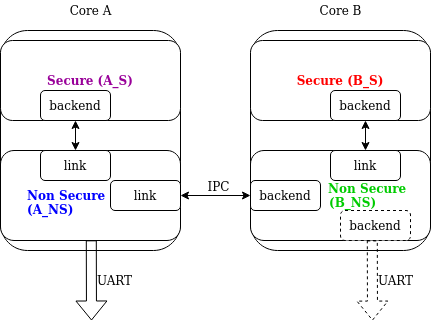
Link 하나가 domain 여러 개를 처리할 수 있습니다. Cortex-M33 core A·B가 각각 TrustZone Secure와 Nonsecure domain을 가진 예에는 domain이 네 개 있습니다. A_NS가 root라면 A_S와 B_NS로 가는 link 두 개를 갖고, B_NS는 B_S로 가는 link와 A_NS로 가는 backend를 가집니다. 각 domain에는 standard logging subsystem이 있으므로 B_NS의 dotted UART처럼 backend를 추가로 병렬 출력할 수도 있습니다.
Domain ID
각 message source는 header의 source_id와 domain_id로 식별합니다. domain_id는 상대값입니다. Domain이 message를 만들 때는 0으로 설정하고, message가 domain 경계를 지날 때마다 link offset을 더합니다.
Logger core가 registered link를 순회하는 initialization에서 offset을 정합니다. 첫 link의 offset은 1이고, 다음 link의 offset은 이전 link offset에 이전 link가 포함한 domain 수를 더한 값입니다.
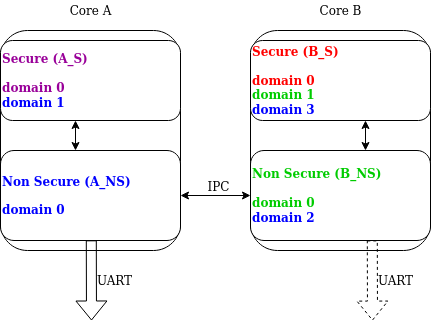
B_S에서 만든 message는 처음 domain_id=0입니다. B_NS-B_S link가 offset 1을 더해 1로 만들고 message를 A_NS로 넘깁니다. A_NS-B_NS link가 offset 2를 더하면 최종 domain_id=3이 되어 originator를 유일하게 식별합니다.
Cross-domain log message
보통 domain마다 address space가 달라 다른 domain data에 직접 접근할 수 없습니다. 따라서 backend는 message를 넘기기 전에 일부를 처리할 수 있습니다. 예를 들어 read-only string까지 package body에 복사해 string package를 fully self-contained version으로 바꿀 수 있습니다.
Domain마다 timestamp source frequency와 offset이 다를 수 있지만 logging subsystem은 timestamp conversion을 수행하지 않습니다.
Runtime filtering
Single-domain에서는 source마다 system backend 각각에 대한 runtime filter variable이 있습니다. Multi-domain의 originator는 root domain에 backend가 몇 개인지 알지 못합니다.
따라서 multi-domain filtering에서는 root로 가는 경로의 각 domain에 source별 runtime filter setting이 필요합니다. Remote source 수를 compile time에 알 수 없으므로 remote filter는 source당 word 하나의 dynamically allocated memory를 사용합니다.
Root backend가 remote module filter를 바꾸면 local filter를 갱신합니다. Local backend 전체의 maximum인 aggregate filter가 바뀌었는지 확인하고, 바뀌면 remote domain에 알립니다. 이 방식으로 single-domain과 같은 filtering 동작을 제공합니다.
Message ordering
Logging은 domain 간 timestamp synchronization을 제공하지 않습니다.
- Timestamp source가 다르면 root domain buffer에 도착한 순서로 처리합니다.
- 같은 timestamp source를 쓰거나 out-of-band mechanism이 timestamp를 다시 계산한다면, 도착 순서로 처리한 뒤 host에서 timestamp로 정렬할 수 있습니다.
- 또는 link마다 전용 buffer를 두고 각 buffer head 중 가장 오래된 message를 먼저 처리할 수 있습니다. 순서는 유지되지만 buffer를 공유하지 않아 memory utilization이 나빠지고
CONFIG_LOG_PROCESSING_LATENCY_US에 따른 latency가 늘어납니다.
Logging backends
Backend는 LOG_BACKEND_DEFINE으로 등록하며 macro가 dedicated memory section에 instance를 만듭니다. log_backend_enable()로 동적으로 켜고 끌 수 있습니다. Runtime filtering이 켜졌으면 log_filter_set()으로 특정 backend의 module filter를 바꿉니다. Module은 source ID와 domain ID로 식별하며 source name을 알고 있으면 registered source를 순회해 source ID를 찾을 수 있습니다.
동시 backend는 최대 9개입니다. Processing phase에서 각 backend에 message를 전달합니다. Panic mode에 들어갈 때 log_backend_panic()으로 알리며 backend는 synchronous interrupt-less mode로 바꾸거나 지원하지 않으면 중지해야 합니다. log_backend_dropped()으로 dropped message 수를 알릴 수도 있습니다.
log_backend_msg_process()는 standard와 hexdump message를 모두 처리합니다. Log message가 argument가 있는 string과 data를 함께 보유하므로 두 형식에 공통이며 deferred·immediate mode에서도 같습니다.
Message formatting
Backend는 include/zephyr/logging/log_output.h의 helper function으로 message를 format할 수 있습니다. log_output_msg_process() 결과 예는 다음과 같습니다.
[00:00:00.000,274] <info> sample_instance.inst1: logging messageDictionary-based Logging
Dictionary-based logging은 사람이 읽는 text 대신 binary format으로 log를 출력합니다. Formatted string argument를 native storage format으로 encode하므로 text보다 compact할 수 있습니다. Format string과 static string argument는 전체 string 대신 ELF file reference를 encode합니다.
Build time dictionary에는 reference와 실제 string의 mapping이 들어 있습니다. Offline parser는 dictionary에서 string을 얻어 message를 해석합니다. 어떤 scenario에서는 더 compact하지만 offline parser가 반드시 필요하고 text log보다 직관적이지 않습니다.
Configuration
CONFIG_LOG_DICTIONARY_SUPPORT는 dictionary logging을 활성화하며 이를 요구하는 backend가 select해야 합니다.CONFIG_LOG_BACKEND_UART_OUTPUT_DICTIONARY_HEX는 UART backend가 dictionary data를 hexadecimal character로 출력하게 합니다. Terminal과 console에서 수동 capture할 때 유용합니다.CONFIG_LOG_BACKEND_UART_OUTPUT_DICTIONARY_BIN은 UART backend가 binary data를 직접 출력하게 합니다.
Usage
Dictionary backend가 활성화되면 build directory에 log_dictionary.json database가 생성됩니다. Parser가 log data를 해석하는 데 필요한 정보가 들어 있으며 같은 build에서만 사용할 수 있고 다른 build와 호환되지 않습니다.
Parser 사용법은 다음과 같습니다.
./scripts/logging/dictionary/log_parser.py <build dir>/log_dictionary.json <log data file>첫 번째 required argument는 JSON database full path, 두 번째는 log data file입니다. Data가 hexadecimal character라면 끝에 --hex를 붙여 parsing 전에 binary로 변환합니다. 자세한 사용 예는 logging-dictionary sample을 참고합니다.
Recommendations
CONFIG_LOG_SPEED를 켜면 memory footprint가 조금 늘지만 deferred logging이 약간 빨라집니다.- C11
_Generic을 지원하는 compiler를 권장합니다. 없으면 cbprintf packaging과 logging performance가 크게 저하됩니다. %s가 constant string을 가리킬 때 pointer를const char *로 cast하는 것이 좋습니다.%s가 transient string을 가리킬 때 pointer를char *로 cast하는 것이 좋습니다.%p에 character pointer를 사용할 때void *같은 non-character pointer로 cast하는 것이 좋습니다.
LOG_WRN("%s", str);
LOG_WRN("%p", (void *)str);
Benchmark
다음 값은 tests/subsys/logging/log_benchmark를 qemu_x86에서 실행한 결과이며, 전체적인 비교를 위한 rough number입니다.
| Feature | Result |
|---|---|
| Kernel logging | 7 us (CONFIG_LOG_SPEED) / 11 us |
| User logging | 13 us |
| Kernel logging with overwrite | 10 us (CONFIG_LOG_SPEED) / 15 us |
| Logging transient string | 42 us |
| Logging transient string from user | 50 us |
| Memory utilization | 518 messages |
| Memory footprint (test) | 2 kB |
| Memory footprint (application) | 3.5 kB |
| Message footprint | 47 (CONFIG_LOG_SPEED) / 32 bytes |
Memory utilization 518은 logging용 2,048 byte에 argument 수가 다양한 message가 들어가는 개수입니다. Test footprint는 filtering·formatting을 쓰지 않는 benchmark subsystem, application footprint는 samples/subsys/logging/logger 기준입니다. Message footprint는 Cortex-M3에서 argument 두 개를 가진 message의 string 제외 average size입니다.
Stack usage
Logging API를 쓰는 context는 stack usage가 늘어납니다. Stack을 지나치게 최적화했다면 overflow로 이어질 수 있습니다. Usage는 mode와 optimization, platform에 따라 크게 달라집니다.
CONFIG_LOG_MODE_DEFERRED에서는 message를 만들고 저장하기만 하므로 일반적으로 stack usage가 작습니다. CONFIG_LOG_MODE_IMMEDIATE에서는 backend processing과 string formatting까지 호출 경로에서 수행하므로 사용하는 backend에 따라 stack이 더 필요합니다.
tests/subsys/logging/log_stack은 default backend만 사용해 mode, optimization과 platform별 stack usage를 측정합니다. Integer argument 두 개를 가진 message의 측정값은 다음과 같습니다.
| Platform | Deferred | Deferred (no optimization) | Immediate | Immediate (no optimization) |
|---|---|---|---|---|
| ARM Cortex-M3 | 40 | 152 | 412 | 783 |
| x86 | 12 | 224 | 388 | 796 |
| riscv32 | 24 | 208 | 456 | 844 |
| xtensa | 72 | 336 | 504 | 944 |
| x86_64 | 32 | 528 | 1088 | 1440 |
API Reference
Logger API
Message 생성 macro와 public logger API는 log_api Doxygen group에 있습니다.
Logger control
Initialization, processing과 panic 제어 API는 log_ctrl group에 있습니다.
Log message
Log message structure와 access API는 log_msg group에 있습니다.
Logger backend interface
Backend 구현 interface는 log_backend group에 있습니다.
Logger output formatting
Backend output formatter helper는 log_output group에 있습니다.
Source
출처
영어 원문에는 문단, 문서 지시문, 표, 코드, 코드 심벌, 경로를 그대로 보존했습니다.