Part 1
요약·해설
Observer attach, priority 1~3 boost와 priority 5 복귀를 설명합니다.
Priority inversion
zbus_obs_attach_to_thread
Boost off · on
Part 2
접을 수 있는 영어 원문 전체
영어 원문 전체 펼치기
C309C50332EDF33DB78729D6D493301095BB4328016206EBCB7E4363C293F4EA
.. zephyr:code-sample:: zbus-priority-boost
   :name: zbus Priority Boost
   :relevant-api: zbus_apis

   Illustrates zbus priority boost feature with a priority inversion scenario.

Overview
********
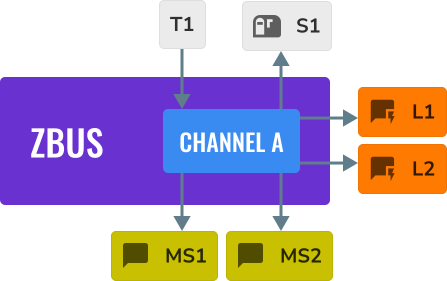
This sample implements a simple application that illustrates the priority boost feature. The
application implements the below figure scenario. When the priority boost feature is disabled, the
execution sequence presents a priority inversion problem, which may not affect much of the
developer's application. Those who want to avoid priority inversions between message subscribers and
plain subscribers should use the priority boost strategy.

.. code-block:: c

   ZBUS_CHAN_DEFINE(chan_a,
                    int,
                    NULL,
                    NULL,
                    ZBUS_OBSERVERS(l1, ms1, ms2, s1, l2),
                    0
   );


.. figure:: ../../../../../../../samples/subsys/zbus/priority_boost/zbus_publishing_process_example_scenario.svg
    :alt: ZBus priority boost scenario example.
    :width: 45%

.. note::

   The developer must use the :c:func:`zbus_obs_attach_to_thread` function to ensure a proper
   priority boost execution.


Building and Running
********************

The figure below illustrates the execution of the cited scenario but with the priority boost
disabled.

.. figure:: ../../../../../../../samples/subsys/zbus/priority_boost/without_hlp_priority_boost_feature.svg
    :alt: ZBus example scenario for priority boost disabled.
    :width: 70%


It can be built and executed on QEMU as follows:

.. zephyr-app-commands::
   :zephyr-app: samples/subsys/zbus/priority_boost -- -DCONFIG_ZBUS_PRIORITY_BOOST=n
   :host-os: unix
   :board: qemu_x86
   :goals: run

Sample Output
=============

.. code-block:: console

   I: --------------
   I: 0 -> T1: prio before 5
   I: 0 ---> L1: T1 prio 5
   I: 0 -> MS1:  T1 prio 5
   I: 0 -> MS2:  T1 prio 5
   I: 0 ---> L2: T1 prio 5
   I: 0 -> T1: prio after 5
   I: N -> S1:  T1 prio 5
   I: 0 -> S1:  T1 prio 5
   I: --------------
   I: 1 -> T1: prio before 5
   I: 1 ---> L1: T1 prio 5
   I: 1 -> MS1:  T1 prio 5
   I: 1 -> MS2:  T1 prio 5
   I: 1 ---> L2: T1 prio 5
   I: 1 -> T1: prio after 5
   I: N -> S1:  T1 prio 5
   I: 1 -> S1:  T1 prio 5
   I: --------------
   I: 2 -> T1: prio before 5
   I: 2 ---> L1: T1 prio 5
   I: 2 -> MS1:  T1 prio 5
   I: 2 ---> L2: T1 prio 5
   I: 2 -> T1: prio after 5
   I: 2 -> MS2:  T1 prio 5
   I: --------------
   I: 3 -> T1: prio before 5
   I: 3 ---> L1: T1 prio 5
   I: 3 -> MS1:  T1 prio 5
   I: 3 ---> L2: T1 prio 5
   I: 3 -> T1: prio after 5
   I: 3 -> MS2:  T1 prio 5
   I: --------------
   I: 4 -> T1: prio before 5
   I: 4 ---> L1: T1 prio 5
   I: 4 ---> L2: T1 prio 5
   I: 4 -> T1: prio after 5
   I: 4 -> MS2:  T1 prio 5
   I: --------------
   I: 5 -> T1: prio before 5
   I: 5 ---> L1: T1 prio 5
   I: 5 ---> L2: T1 prio 5
   I: 5 -> T1: prio after 5
   I: 5 -> MS2:  T1 prio 5
   I: --------------
   I: 6 -> T1: prio before 5
   I: 6 ---> L1: T1 prio 5
   I: 6 -> MS1:  T1 prio 5
   I: 6 -> MS2:  T1 prio 5
   I: 6 ---> L2: T1 prio 5
   I: 6 -> T1: prio after 5
   I: N -> S1:  T1 prio 5
   I: 6 -> S1:  T1 prio 5
   I: --------------
   <continues>


Exit QEMU by pressing :kbd:`CTRL+A` :kbd:`x`.


The figure below illustrates the execution of the same scenario but with the priority boost enabled.
The developer must enable the priority boost and properly attach all the observers to their threads.

.. figure:: ../../../../../../../samples/subsys/zbus/priority_boost/with_hlp_priority_boost_feature.svg
    :alt: ZBus example scenario for priority boost enabled.
    :width: 75%

To execute the sample with priority boost feature enabled, run the following command:

.. zephyr-app-commands::
   :zephyr-app: samples/subsys/zbus/priority_boost -- -DCONFIG_ZBUS_PRIORITY_BOOST=y
   :host-os: unix
   :board: qemu_x86
   :goals: run

Sample Output
=============

.. code-block:: console

   I: --------------
   I: 0 -> T1: prio before 5
   I: 0 ---> L1: T1 prio 1
   I: 0 ---> L2: T1 prio 1
   I: N -> S1:  T1 prio 5
   I: 0 -> S1:  T1 prio 5
   I: 0 -> MS1:  T1 prio 5
   I: 0 -> MS2:  T1 prio 5
   I: 0 -> T1: prio after 5
   I: --------------
   I: 1 -> T1: prio before 5
   I: 1 ---> L1: T1 prio 1
   I: 1 ---> L2: T1 prio 1
   I: N -> S1:  T1 prio 5
   I: 1 -> S1:  T1 prio 5
   I: 1 -> MS1:  T1 prio 5
   I: 1 -> MS2:  T1 prio 5
   I: 1 -> T1: prio after 5
   I: --------------
   I: 2 -> T1: prio before 5
   I: 2 ---> L1: T1 prio 2
   I: 2 ---> L2: T1 prio 2
   I: 2 -> MS1:  T1 prio 5
   I: 2 -> MS2:  T1 prio 5
   I: 2 -> T1: prio after 5
   I: --------------
   I: 3 -> T1: prio before 5
   I: 3 ---> L1: T1 prio 2
   I: 3 ---> L2: T1 prio 2
   I: 3 -> MS1:  T1 prio 5
   I: 3 -> MS2:  T1 prio 5
   I: 3 -> T1: prio after 5
   I: --------------
   I: 4 -> T1: prio before 5
   I: 4 ---> L1: T1 prio 3
   I: 4 ---> L2: T1 prio 3
   I: 4 -> MS2:  T1 prio 5
   I: 4 -> T1: prio after 5
   I: --------------
   I: 5 -> T1: prio before 5
   I: 5 ---> L1: T1 prio 3
   I: 5 ---> L2: T1 prio 3
   I: 5 -> MS2:  T1 prio 5
   I: 5 -> T1: prio after 5
   I: --------------
   I: 6 -> T1: prio before 5
   I: 6 ---> L1: T1 prio 1
   I: 6 ---> L2: T1 prio 1
   I: N -> S1:  T1 prio 5
   I: 6 -> S1:  T1 prio 5
   I: 6 -> MS1:  T1 prio 5
   I: 6 -> MS2:  T1 prio 5
   I: 6 -> T1: prio after 5
   I: --------------
   <continues>


Exit QEMU by pressing :kbd:`CTRL+A` :kbd:`x`.
Part 3
한국어 전문 번역
개요
Priority inversion scenario를 통해 Zbus priority boost 기능을 설명하는 sample입니다. 기능을 끄면 실행 순서에 priority inversion이 나타날 수 있습니다. Message subscriber와 일반 subscriber 사이의 priority inversion을 피하려면 priority boost strategy를 사용합니다.
Channel chan_a에는 listener l1, message subscriber ms1·ms2, subscriber s1, listener l2가 이 순서로 등록됩니다.
ZBUS_CHAN_DEFINE(chan_a,
                 int,
                 NULL,
                 NULL,
                 ZBUS_OBSERVERS(l1, ms1, ms2, s1, l2),
                 0
);
올바른 priority boost 실행을 보장하려면 개발자가 zbus_obs_attach_to_thread()로 observer를 해당 thread에 연결해야 합니다.
빌드 및 실행
다음 그림은 priority boost를 비활성화한 같은 scenario의 실행 순서를 보여 줍니다.
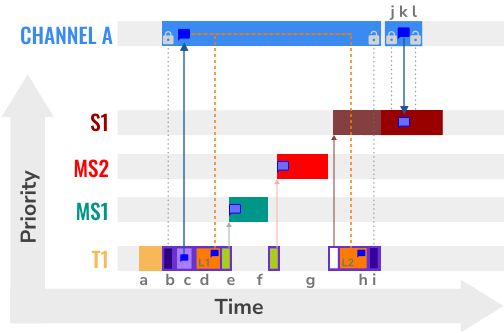
다음 command로 CONFIG_ZBUS_PRIORITY_BOOST=n을 지정해 qemu_x86에서 실행합니다.
# From the root of the zephyr repository
west build -b qemu_x86 samples/subsys/zbus/priority_boost -- -DCONFIG_ZBUS_PRIORITY_BOOST=n
west build -t run
샘플 출력
기능을 끄면 publisher thread T1의 priority는 처리 전후 모두 5입니다. Listener와 message subscriber, 일반 subscriber 실행이 observer readiness에 따라 뒤섞이고 일부 message에서는 MS2 처리가 publisher 반환 뒤에 나타나 priority inversion scenario를 확인할 수 있습니다.
I: --------------
I: 0 -> T1: prio before 5
I: 0 ---> L1: T1 prio 5
I: 0 -> MS1:  T1 prio 5
I: 0 -> MS2:  T1 prio 5
I: 0 ---> L2: T1 prio 5
I: 0 -> T1: prio after 5
I: N -> S1:  T1 prio 5
I: 0 -> S1:  T1 prio 5
I: --------------
I: 1 -> T1: prio before 5
I: 1 ---> L1: T1 prio 5
I: 1 -> MS1:  T1 prio 5
I: 1 -> MS2:  T1 prio 5
I: 1 ---> L2: T1 prio 5
I: 1 -> T1: prio after 5
I: N -> S1:  T1 prio 5
I: 1 -> S1:  T1 prio 5
I: --------------
I: 2 -> T1: prio before 5
I: 2 ---> L1: T1 prio 5
I: 2 -> MS1:  T1 prio 5
I: 2 ---> L2: T1 prio 5
I: 2 -> T1: prio after 5
I: 2 -> MS2:  T1 prio 5
I: --------------
I: 3 -> T1: prio before 5
I: 3 ---> L1: T1 prio 5
I: 3 -> MS1:  T1 prio 5
I: 3 ---> L2: T1 prio 5
I: 3 -> T1: prio after 5
I: 3 -> MS2:  T1 prio 5
I: --------------
I: 4 -> T1: prio before 5
I: 4 ---> L1: T1 prio 5
I: 4 ---> L2: T1 prio 5
I: 4 -> T1: prio after 5
I: 4 -> MS2:  T1 prio 5
I: --------------
I: 5 -> T1: prio before 5
I: 5 ---> L1: T1 prio 5
I: 5 ---> L2: T1 prio 5
I: 5 -> T1: prio after 5
I: 5 -> MS2:  T1 prio 5
I: --------------
I: 6 -> T1: prio before 5
I: 6 ---> L1: T1 prio 5
I: 6 -> MS1:  T1 prio 5
I: 6 -> MS2:  T1 prio 5
I: 6 ---> L2: T1 prio 5
I: 6 -> T1: prio after 5
I: N -> S1:  T1 prio 5
I: 6 -> S1:  T1 prio 5
I: --------------
<continues>
QEMU를 종료하려면 CTRL+A를 누른 뒤 x를 누릅니다.
다음 그림은 priority boost를 활성화한 동일 scenario입니다. 기능을 enable하고 모든 observer를 각 thread에 올바르게 attach해야 합니다.
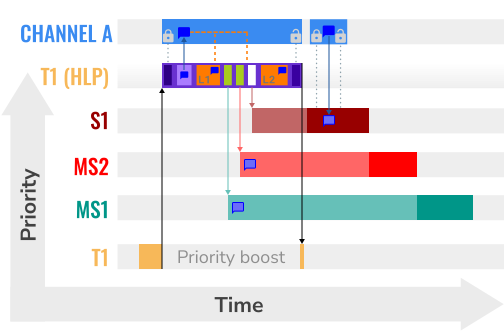
다음 command로 CONFIG_ZBUS_PRIORITY_BOOST=y을 지정해 실행합니다.
# From the root of the zephyr repository
west build -b qemu_x86 samples/subsys/zbus/priority_boost -- -DCONFIG_ZBUS_PRIORITY_BOOST=y
west build -t run
Priority boost 활성화 출력
기능을 켜면 T1은 publish 전후 priority 5를 유지하지만 listener L1과 L2를 실행하는 동안 observer thread 조건에 맞춰 priority 1, 2 또는 3으로 일시적으로 boost됩니다. Listener 처리가 먼저 정리된 뒤 subscriber가 실행되고 T1은 원래 priority로 복귀합니다.
I: --------------
I: 0 -> T1: prio before 5
I: 0 ---> L1: T1 prio 1
I: 0 ---> L2: T1 prio 1
I: N -> S1:  T1 prio 5
I: 0 -> S1:  T1 prio 5
I: 0 -> MS1:  T1 prio 5
I: 0 -> MS2:  T1 prio 5
I: 0 -> T1: prio after 5
I: --------------
I: 1 -> T1: prio before 5
I: 1 ---> L1: T1 prio 1
I: 1 ---> L2: T1 prio 1
I: N -> S1:  T1 prio 5
I: 1 -> S1:  T1 prio 5
I: 1 -> MS1:  T1 prio 5
I: 1 -> MS2:  T1 prio 5
I: 1 -> T1: prio after 5
I: --------------
I: 2 -> T1: prio before 5
I: 2 ---> L1: T1 prio 2
I: 2 ---> L2: T1 prio 2
I: 2 -> MS1:  T1 prio 5
I: 2 -> MS2:  T1 prio 5
I: 2 -> T1: prio after 5
I: --------------
I: 3 -> T1: prio before 5
I: 3 ---> L1: T1 prio 2
I: 3 ---> L2: T1 prio 2
I: 3 -> MS1:  T1 prio 5
I: 3 -> MS2:  T1 prio 5
I: 3 -> T1: prio after 5
I: --------------
I: 4 -> T1: prio before 5
I: 4 ---> L1: T1 prio 3
I: 4 ---> L2: T1 prio 3
I: 4 -> MS2:  T1 prio 5
I: 4 -> T1: prio after 5
I: --------------
I: 5 -> T1: prio before 5
I: 5 ---> L1: T1 prio 3
I: 5 ---> L2: T1 prio 3
I: 5 -> MS2:  T1 prio 5
I: 5 -> T1: prio after 5
I: --------------
I: 6 -> T1: prio before 5
I: 6 ---> L1: T1 prio 1
I: 6 ---> L2: T1 prio 1
I: N -> S1:  T1 prio 5
I: 6 -> S1:  T1 prio 5
I: 6 -> MS1:  T1 prio 5
I: 6 -> MS2:  T1 prio 5
I: 6 -> T1: prio after 5
I: --------------
<continues>
QEMU를 종료하려면 CTRL+A를 누른 뒤 x를 누릅니다.
Source
출처
영어 원문에는 문단, 문서 지시문, 표, 코드, 코드 심벌, 경로를 그대로 보존했습니다.